


Which Sleep States Are Available on Your PC?
By selma čitakovićon 05/17/2026 |
![{$insert['content_title']](/content/file/6013_image1.png
)
Your PC supports more power states than just on and off. Some of them are even hybrid and altered versions of existing states. They differ based on how much power the computer uses, when your operating system restarts, how long it takes for your computer to boot to a working state, and other factors.
In short, there are six system power states, numbered S0 to S5, with S1, S2, and S3 being sleep states specifically.
To see which ones are available/unavailable on your system, do the following:
- Press Win + X, select Terminal, and open either PowerShell or Command Prompt.
- Type the following command and press Enter: powercfg /a
- You should see a list of available sleep states and the ones not supported right under.
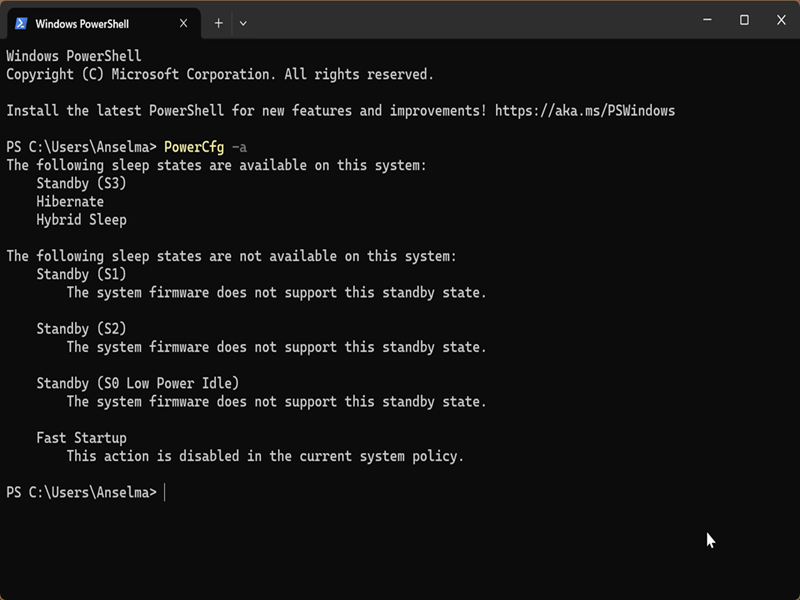
For example, my laptop supports Standby (S3), Hibernate, and Hybrid Sleep. Your device's sleep states might be entirely different.
Here's a quick rundown of all the available power states:
- Working (S0) - Your device is on and in a full running state.
- Modern Standby (S0 low-power idle) - The system is partially running and can wake up very quickly when needed, almost like a smartphone.
- Sleep (S1, S2, S3) - Three sleep states with different levels of power consumption, with S3 consuming the least but also taking the longest time to wake. All three states retain system memory.
- Hybrid sleep - A special state that's between sleep and hibernate in which the system uses a hibernation file with S1-S3.
- Hibernate (S4) - During hibernation, your device looks like it's off and consumes minimal power. It preserves the system state in the form of a hibernation file.
- Fast startup - An incomplete shutdown (often enabled by default) where the user is logged off before the hibernation file is created. It's quick, but it's no good in scenarios where a full shutdown is needed.
- Soft off (S5) - A complete shutdown where the entire user session is torn down and restarted on reboot, giving you a fresh start. The system also doesn't create a hibernation file.
- Mechanical off (G3) - A complete shutdown where your device is also unplugged or physically disconnected from power.
Some states exclude others. For example, if your device supports modern standby, it won't support hybrid sleep by default. Similarly, if it supports sleep states, it will either be S1 or S2 or S3, not all three.
Overall, in Windows 10 and 11 devices, the two most commonly supported power models are modern standby and S3. Personally, I'm glad that my laptop supports S3 instead of modern standby, because a lot of users have complained about overheating and battery drain issues.
What about your PC? If you're experiencing any kind of sleep or power-related problems, your first troubleshooting step should be to find out which sleep states it supports.

|
selma citakovic
Selma is a gamer, geek and gremlin hunter with a passion for cyber security and smashing Windows bugs before they bite. She’s IBM-certified, loves real freeware, despises bloatware, and powers most of her troubleshooting with an unhealthy amount of coffee. |
comments powered by Disqus
