


Lossless Extract
4.1.4 
|
Author:
Lossless Extract
Date: 09/22/26 Size: 42 MB License: Freemium Requires: 11|10|macOS Downloads: 1898 times  TIP:
Click Here to Repair or
TIP:
Click Here to Repair orRestore Missing Windows Files |
Download (EXE) Download (Mac Intel) Download (Mac Apple Silicon)
|
MajorGeeks: Setting the standard for editor-tested, trusted, and secure downloads since 2002. |
 Avast Free Antivirus Worried about finance scams?
Get free antivirus with AI-powered online scam detection Download Free!
Lossless Extract is designed specifically for audiophiles and sound purists who demand uncompromising preservation of audio quality. This software aims for precision and simplicity, enabling you to effortlessly extract high-resolution audio from various sources, including Blu-ray Discs, SACDs, MKVs, and DVD-Audio.
Lossless Extract can handle advanced audio formats, such as Dolby TrueHD (with Atmos support) and DTS-HD Master Audio, preserving the original Atmos object-based metadata. Unlike many other conversion tools that reduce immersive audio to PCM, which can permanently destroy the intricate spatial metadata essential to a full surround sound experience, Lossless Extract preserves the integrity of the original audio stream. This means that users can enjoy the intended immersive audio mix on compatible audio-video receivers (AVRs) and streaming devices without any loss of fidelity.
Lossless Extract accepts a variety of input file formats, including MKV, Blu-Ray BDMV, DVD-AUDIO ISO files, AUDIO_TS folders, and SACD ISOs. Users can choose their desired output format from options including FLAC, MKA, M4A, DSF, DFF, and Direct Stream Copy. Regardless of the choice, Lossless Extract delivers pristine, bit-for-bit copies, ensuring that every detail of the original audio is preserved with unwavering accuracy.
The application supports a wide range of audio tracks, including Dolby TrueHD with Atmos, DTS-HD Master Audio, and standard AC3/DTS/PCM, without transcoding, ensuring zero quality loss. As a native application for Windows and Mac, it features a clean, efficient design that enhances usability, along with multithreading for rapid processing and batch extraction.
Whether you are archiving your home theater collection or preparing high-end audio projects, Lossless Extract ensures that every nuance and subtlety of the sound is captured and preserved, time and time again.
To streamline organization, Lossless Extract features automatic tagging and artwork retrieval, fetching essential details such as album art, artist names, and track titles. Additionally, it includes a smart renaming function that organizes files in the output folder by song name, ensuring a consistent, library-ready file structure.
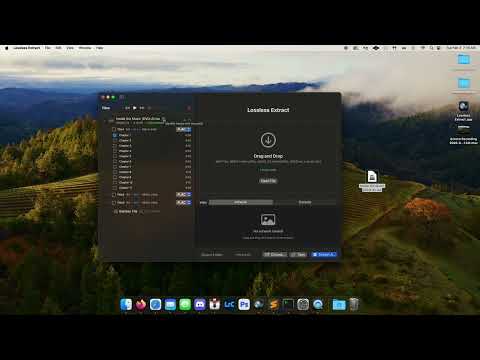
There are a number of other tutorials available here.
As a bonus for Mac users, Lossless Extract is the only Mac application that supports direct export of DTS-HD MA and Atmos audio to M4A containers, simplifying tagging and playback in media players such as Kodi. Users can effortlessly extract Dolby TrueHD (with Atmos), SACD DSD, and DTS-HD Master Audio in full fidelity while maintaining the valuable Atmos metadata.
For Windows, Lossless Extract does require Microsoft .NET to be installed. If you don't already have Lossless Extract downloaded (from us, of course), Lossless Extract will prompt you to do so.
In conclusion, Lossless Extract stands out as an essential ally for audiophiles, sound engineers, home theater aficionados, and anyone who cherishes the art of impeccable sound reproduction. Its unparalleled quality ensures every note, nuance, and moment of your audio experience is delivered without compromise. The fact that it is also easy to use doesn't hurt!
Similar:
● How-to Edit Your Videos With the Microsoft Photo App
● Video: How to Disable Video Tips In Windows 10 & 11
● How to Fix Videos Folder Missing or Duplicate Documents Folder in Windows 10 & 11
What Can Lossless Extract Do?
Lossless Extract can handle advanced audio formats, such as Dolby TrueHD (with Atmos support) and DTS-HD Master Audio, preserving the original Atmos object-based metadata. Unlike many other conversion tools that reduce immersive audio to PCM, which can permanently destroy the intricate spatial metadata essential to a full surround sound experience, Lossless Extract preserves the integrity of the original audio stream. This means that users can enjoy the intended immersive audio mix on compatible audio-video receivers (AVRs) and streaming devices without any loss of fidelity.
Input File Formats
Lossless Extract accepts a variety of input file formats, including MKV, Blu-Ray BDMV, DVD-AUDIO ISO files, AUDIO_TS folders, and SACD ISOs. Users can choose their desired output format from options including FLAC, MKA, M4A, DSF, DFF, and Direct Stream Copy. Regardless of the choice, Lossless Extract delivers pristine, bit-for-bit copies, ensuring that every detail of the original audio is preserved with unwavering accuracy.
Support for Batch Processing
The application supports a wide range of audio tracks, including Dolby TrueHD with Atmos, DTS-HD Master Audio, and standard AC3/DTS/PCM, without transcoding, ensuring zero quality loss. As a native application for Windows and Mac, it features a clean, efficient design that enhances usability, along with multithreading for rapid processing and batch extraction.
Whether you are archiving your home theater collection or preparing high-end audio projects, Lossless Extract ensures that every nuance and subtlety of the sound is captured and preserved, time and time again.
Auto-Tagging and More
To streamline organization, Lossless Extract features automatic tagging and artwork retrieval, fetching essential details such as album art, artist names, and track titles. Additionally, it includes a smart renaming function that organizes files in the output folder by song name, ensuring a consistent, library-ready file structure.
▶
There are a number of other tutorials available here.
For Mac Users
As a bonus for Mac users, Lossless Extract is the only Mac application that supports direct export of DTS-HD MA and Atmos audio to M4A containers, simplifying tagging and playback in media players such as Kodi. Users can effortlessly extract Dolby TrueHD (with Atmos), SACD DSD, and DTS-HD Master Audio in full fidelity while maintaining the valuable Atmos metadata.
Requirement for Windows Users
For Windows, Lossless Extract does require Microsoft .NET to be installed. If you don't already have Lossless Extract downloaded (from us, of course), Lossless Extract will prompt you to do so.
Geek Verdict
In conclusion, Lossless Extract stands out as an essential ally for audiophiles, sound engineers, home theater aficionados, and anyone who cherishes the art of impeccable sound reproduction. Its unparalleled quality ensures every note, nuance, and moment of your audio experience is delivered without compromise. The fact that it is also easy to use doesn't hurt!
Similar:
● How-to Edit Your Videos With the Microsoft Photo App
● Video: How to Disable Video Tips In Windows 10 & 11
● How to Fix Videos Folder Missing or Duplicate Documents Folder in Windows 10 & 11
Version History for Lossless Extract :
https://losslessextract.com/3-0-whats-new/
Limitations:
Lossless Extract features a fully functional 14-day trial with no feature restrictions! Lossless Extract's price is $24.95
Editor's Note:
Requires Microsoft .NET
 Screenshot for Lossless Extract
Top Downloads In Audio Tools
 mp3DirectCut 2.40 [ 2026-03-30 04:12:27 | 324 KB | Freeware | 11|10|8|7|Android | 5 ] YamiPod 1.8 [ 2009-01-05 10:45:45 | 4.65 MB | Freeware | Win7/Vista/XP | 5 ] Mp3tag 3.37 Beta 3 / 3.36.1 [ 2026-10-15 20:47:40 | 6 MB | Freeware | 11|10|8|7 | 5 ] DarkWave Studio 5.9.4 [ 2020-11-16 10:14:35 | 2.13 MB | Freeware | 10|8|7 | 4 ] SoundFont Midi Player 5.7 [ 2019-04-28 09:25:11 | 1.64 MB+ | Freeware | Win 10 / 8 / 7 / Vista / XP | 5 ]
 Tactical Briefings
Comment Rules & Etiquette - We welcome all comments from our readers, but any comment section requires some moderation. Some posts are auto-moderated to reduce spam, including links and swear words. When you make a post, and it does not appear, it went into moderation. We are emailed when posts are marked as spam and respond ASAP. Some posts might be deleted to reduce clutter. Examples include religion, politics, and comments about listing errors (after we fix the problem and upvote your comment). Finally, be nice. Thank you for choosing MajorGeeks.

© 2000-2026 MajorGeeks.com
Powered by Contentteller® CMS System