


How to Run Windows 10 Troubleshooters Automatically
By Timothy Tibbettson 06/15/2023 |
Beginning with Windows 10 Build 1903, Microsoft will be upgrading the built-in troubleshooters with a feature called Recommended Troubleshooting. This new feature can optionally fix critical problems when they appear. In this guide, we show you the three options available for this feature.
Open Start > Settings > Update and Security > Troubleshoot. The updated Troubleshooting section looks like this:
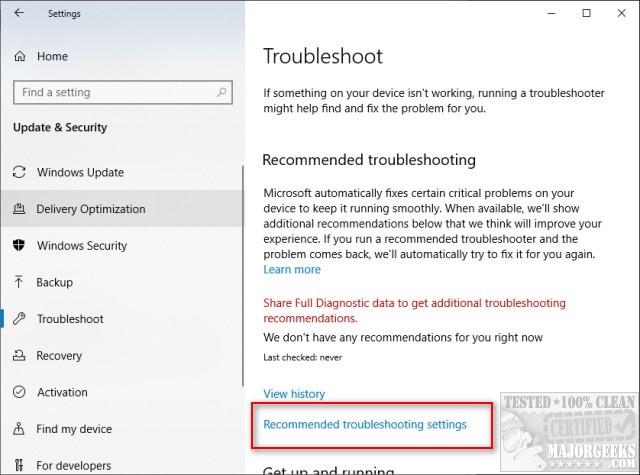
Scroll down to Recommended troubleshooting settings.
There are three options available:
Fix problems for me without asking
Tell me when problems get fixed
Ask me before fixing problems
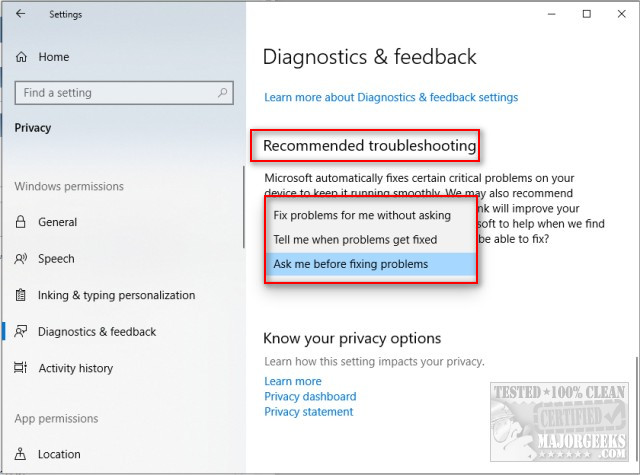
Fix problems for me without asking is the one you want to allow troubleshooters to run as needed when a critical problem appears.
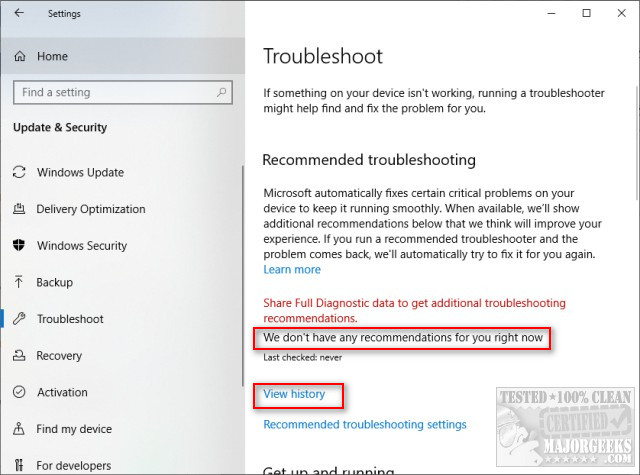
Windows 10 can also show you troubleshooting recommendations and show a history of problems solved. Click the back arrow to go to Troubleshoot and look for View history.
Similar:
Windows 10 Problems You Can Fix Yourself With Included Troubleshooters
Troubleshooting Microsoft .NET Framework Installations and Uninstallations
Troubleshooting Windows 10 Blue Screen Errors
Network Diagnostics Troubleshooter Reports Problem With Wireless Adapter or Access Point
How to Troubleshoot Windows Media Player Issues
comments powered by Disqus
Open Start > Settings > Update and Security > Troubleshoot. The updated Troubleshooting section looks like this:
Scroll down to Recommended troubleshooting settings.
There are three options available:
Fix problems for me without asking is the one you want to allow troubleshooters to run as needed when a critical problem appears.
Windows 10 can also show you troubleshooting recommendations and show a history of problems solved. Click the back arrow to go to Troubleshoot and look for View history.
Similar:
comments powered by Disqus
