


How to Fix Windows Upgrade Error 0XC1900404
By Timothy Tibbettson 06/24/2023 |
Windows Upgrade error 0XC1900404 is often related to your installation media (ISO, DVD, thumb drive). Here are a few steps to resolve the problem.
You may also see "0XC1900404, MOSETUP_E_UA_BOX_NOT_FOUND, The installation executable was not found."
1: Windows Upgrade Error 0XC1900404 - Windows Repair
Your current install source might be corrupted. Download a new Windows ISO. You can do this with the Media Creation Tool.
2: Windows Upgrade Error 0XC1900404 - Windows Repair
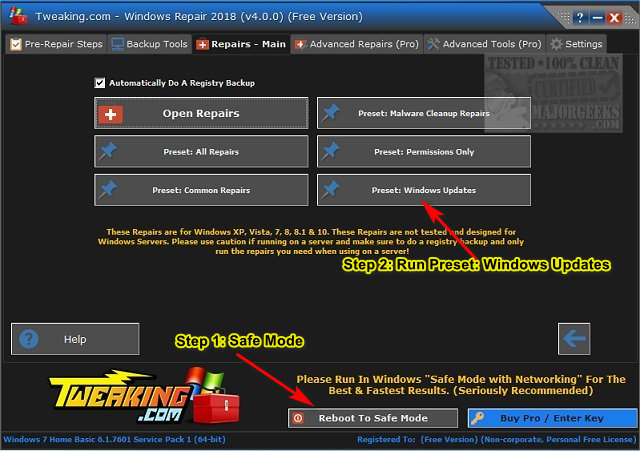
Windows Repair can reset all the Windows Update settings saving you a lot of work.
Download Windows Repair from MajorGeeks.
Boot into Safe Mode.
Select Preset: Windows Updates.
3: Windows Upgrade Error Code 0XC1900404 - Clear SoftwareDistribution & Catroot Folders
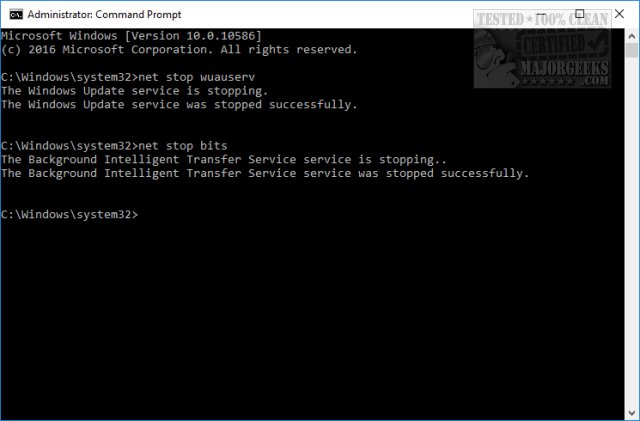
Open a elevated command prompt and type in the following two lines, and press Enter after each:
net stop wuauserv
net stop bits
Each command should take a few seconds, so wait until you see the messages that the services were stopped successfully. Leave the command prompt open for now.
Navigate to C:WindowsSoftwareDistribution and open the folder. Press CTRL + A to select all files and folder, then press the Delete key. All the files in the SoftwareDistribution should be deleted. We don't want to delete the folder itself.
Rebooting will start the two services we stopped, but if you don't want to reboot, open up the command prompt again and type in the following two lines, and press Enter after each:
net start wuauserv
net start bits
Next, delete the Catroot or Catroot2 folders.
Some of the other similar links below can also help.
Similar:
What Is the $Windows.~Bt Folder and Can I Delete It?
What Is the $SysReset Folder and Can I Delete It in Windows 10?
What Are the $GetCurrent and $WINDOWS.~BT Folders and How to Delete Them
What Is the $WinREAgent Folder and Can I Delete It?
comments powered by Disqus
You may also see "0XC1900404, MOSETUP_E_UA_BOX_NOT_FOUND, The installation executable was not found."
1: Windows Upgrade Error 0XC1900404 - Windows Repair
Your current install source might be corrupted. Download a new Windows ISO. You can do this with the Media Creation Tool.
2: Windows Upgrade Error 0XC1900404 - Windows Repair
Windows Repair can reset all the Windows Update settings saving you a lot of work.
Download Windows Repair from MajorGeeks.
Boot into Safe Mode.
Select Preset: Windows Updates.
3: Windows Upgrade Error Code 0XC1900404 - Clear SoftwareDistribution & Catroot Folders
Open a elevated command prompt and type in the following two lines, and press Enter after each:
net stop wuauserv
net stop bits
Each command should take a few seconds, so wait until you see the messages that the services were stopped successfully. Leave the command prompt open for now.
Navigate to C:WindowsSoftwareDistribution and open the folder. Press CTRL + A to select all files and folder, then press the Delete key. All the files in the SoftwareDistribution should be deleted. We don't want to delete the folder itself.
Rebooting will start the two services we stopped, but if you don't want to reboot, open up the command prompt again and type in the following two lines, and press Enter after each:
net start wuauserv
net start bits
Next, delete the Catroot or Catroot2 folders.
Some of the other similar links below can also help.
Similar:
What Is the $Windows.~Bt Folder and Can I Delete It?
What Is the $SysReset Folder and Can I Delete It in Windows 10?
What Are the $GetCurrent and $WINDOWS.~BT Folders and How to Delete Them
What Is the $WinREAgent Folder and Can I Delete It?
comments powered by Disqus
