


NVIDIA GeForce Experience C++ Runtime Error
By Timothy Tibbettson 06/24/2023 |
NVIDIA GeForce Experience C++ Runtime Error can appear at any time, most often when updating but also when uninstalling. Here are some known steps to resolve the problem.
NVIDIA GeForce Experience C++ Runtime Error - Reboot
If there was a problem during installation, a reboot should clean up any temporary files and allow you to install the update.
NVIDIA GeForce Experience C++ Runtime Error - Update Drivers
Updating your drivers can also update Geforce Experience if you're using the Standard or Game-Ready Drivers. You can also try updating GeForce Experience only.
GeForce Experience
Nvidia GeForce Drivers for Windows 10
Nvidia GeForce Drivers for Windows 7 & 8
NVIDIA GeForce Experience C++ Runtime Error - Update Visual C++ Runtimes
Not surprisingly, a Visual C++ error can be a problem with Microsoft Visual C++ runtime files.
You can download the latest Microsoft C++ from Microsoft or try a third-party installer.
NVIDIA GeForce Experience C++ Runtime Error - Run as Administrator
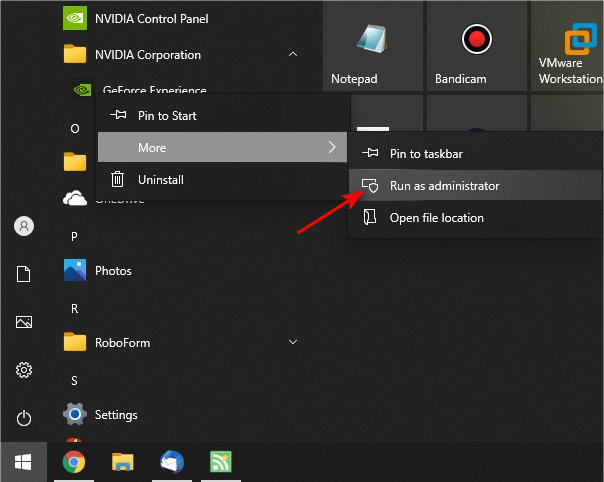
Right-click on your shortcut or go to Start > NVIDIA Corporation > GeForce Experience and click Run as Administrator.
NVIDIA GeForce Experience C++ Runtime Error - Disable Services
If you can't uninstall GeForce Experience, press the Windows Key + R, type in services.msc, and press Enter.
Scroll down and find all services that say NVIDIA.
Right-click on each service with a Status of Running and click Stop.
Now try uninstalling GeForce Experience.
Similar:
Show or Hide NVIDIA Control Panel in the Context Menu and System Tray
Show or Hide NVIDIA Display GPU Activity Icon in System Tray
What is the NVIDIA Ansel Folder and Can You Delete it?
comments powered by Disqus
NVIDIA GeForce Experience C++ Runtime Error - Reboot
If there was a problem during installation, a reboot should clean up any temporary files and allow you to install the update.
NVIDIA GeForce Experience C++ Runtime Error - Update Drivers
Updating your drivers can also update Geforce Experience if you're using the Standard or Game-Ready Drivers. You can also try updating GeForce Experience only.
NVIDIA GeForce Experience C++ Runtime Error - Update Visual C++ Runtimes
Not surprisingly, a Visual C++ error can be a problem with Microsoft Visual C++ runtime files.
You can download the latest Microsoft C++ from Microsoft or try a third-party installer.
NVIDIA GeForce Experience C++ Runtime Error - Run as Administrator
Right-click on your shortcut or go to Start > NVIDIA Corporation > GeForce Experience and click Run as Administrator.
NVIDIA GeForce Experience C++ Runtime Error - Disable Services
If you can't uninstall GeForce Experience, press the Windows Key + R, type in services.msc, and press Enter.
Scroll down and find all services that say NVIDIA.
Right-click on each service with a Status of Running and click Stop.
Now try uninstalling GeForce Experience.
Similar:
comments powered by Disqus
