


How to Check Driver Model WDDM Version in Windows
By Timothy Tibbettson 06/30/2023 |
WDDM (Windows Display Driver Model) is a display driver architecture introduced with Windows Vista that improves graphics performance over the previous architecture by more fully utilizing a computer's GPU to render system graphics. In this tutorial, we check your WDDM version to see if it's correct.
Press the Windows Key + R, type in dxdiag and press Enter or click OK.
Click on the Display tab.
Look for Driver Model: on the right under Drivers.
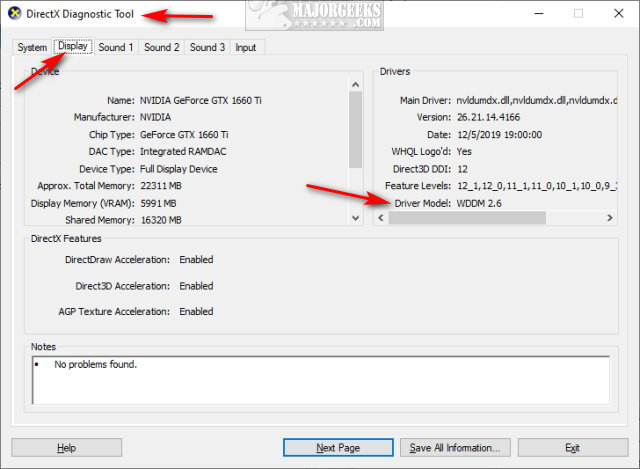
Here are the operating systems and expected WDDM versions:
Windows Vista - WDDM 1.0
Windows 7 - WDDM 1.1
Windows 8 - WDDM 1.2
Windows 8.1 - WDDM 1.3
Windows 10 Build 10240 - WDDM 2.0
Windows 10 Version 1607 - WDDM 2.1
Windows 10 Version 1703 - WDDM 2.2
Windows 10 Version 1709 - WDDM 2.3
Windows 10 Version 1803 - WDDM 2.4
Windows 10 Version 1809 - WDDM 2.5
Windows 10 Version 1903 - WDDM 2.6
Similar:
What is Windows Hardware Quality Labs or WHQL?
How to Download the Latest Drivers for Windows
How-To Backup and Restore Your Drivers
How-To Stop Windows Updates From Downloading Drivers on Windows 10
How to View Recently Updated Windows Drivers
How to Use Driver Verifier Manager to Troubleshoot Driver Issues
As you might have guessed, the model numbers will continue to advance (2.7, 2.8, 2.9) as Windows 10 releases new Feature builds.
comments powered by Disqus
Press the Windows Key + R, type in dxdiag and press Enter or click OK.
Click on the Display tab.
Look for Driver Model: on the right under Drivers.
Here are the operating systems and expected WDDM versions:
Windows Vista - WDDM 1.0
Windows 7 - WDDM 1.1
Windows 8 - WDDM 1.2
Windows 8.1 - WDDM 1.3
Windows 10 Build 10240 - WDDM 2.0
Windows 10 Version 1607 - WDDM 2.1
Windows 10 Version 1703 - WDDM 2.2
Windows 10 Version 1709 - WDDM 2.3
Windows 10 Version 1803 - WDDM 2.4
Windows 10 Version 1809 - WDDM 2.5
Windows 10 Version 1903 - WDDM 2.6
Similar:
As you might have guessed, the model numbers will continue to advance (2.7, 2.8, 2.9) as Windows 10 releases new Feature builds.
comments powered by Disqus
