


How to Remove the Feedback Smiley Button in Microsoft Edge
By Timothy Tibbettson 07/18/2023 |
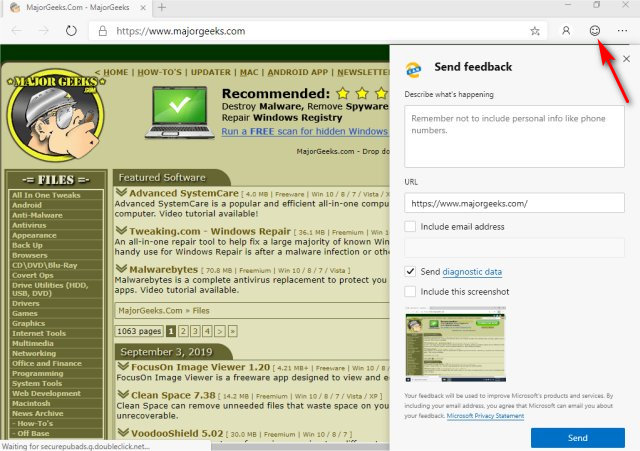
As Microsoft continues developing the Chromium-based Microsoft Edge, you might have noticed the Feedback smiley located in the top right corner. Clicking the smiley face will open a Send Feedback page. There's currently no setting to remove the smiley, but we can remove the Feedback button using the registry.
We can either edit the registry or download a registry file to make the changes quickly.
Before you begin, you must be using the Beta, Canary, or Dev versions of Edge or you won't find the registry entries. We were able to use the registry files even when the registry keys needed weren't there on the Microsoft Edge stable release, so we recommend you download the registry files.
1: Download Registry Files
You can beat downloading these registry files.
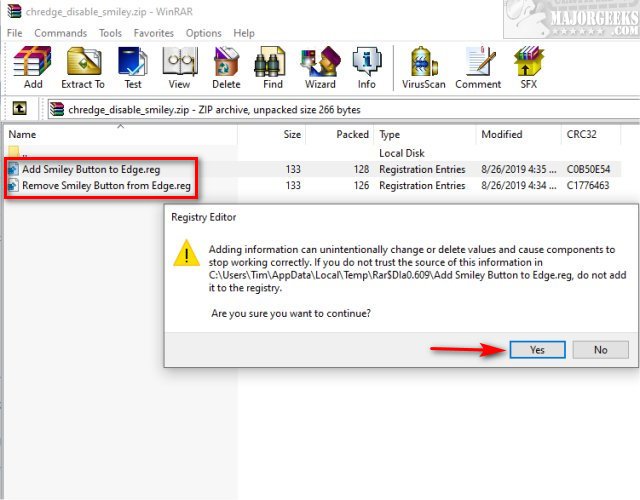
Double-click the registry file you need:
Remove Smiley Button to Edge.reg removes the smiley button.
Add Smiley Button to Edge.reg add the smiley button.
You will, as always, get a warning. Click Yes to continue. Start Microsoft Edge again.
That's it!
2: Edit the Registry
So, you've opted for the hard way? Let's take a look.
Open Regedit (Windows Key + R, type in Regedit, press Enter) and navigate to HKEY_LOCAL_MACHINE\SOFTWARE\Policies\Microsoft\Edge.
Right-click on the right side of the screen when at the Edge key and create a New > 32-bit DWORD Value and name that UserFeedbackAllowed.
Now, double-click on your new UserFeedbackAllowed entry and use one of the two following options:
UserFeedbackAllowed = 1 - the smiley button is visible (used by default).
UserFeedbackAllowed = 0 - the smiley button is disabled.
Similar:
Download Remove the Feedback Smiley Button in Microsoft Edge
How to Enable or Disable About:Flags Page in Microsoft Edge
How to Install Extensions on Microsoft Edge from Chrome Web Store
How to Clear browsing Data When Microsoft Edge is Closed
How to Change the Default Search Engine in the Chromium-Based Microsoft Edge
How to Manage Passwords, Payment Info, and Addresses in Chromium-Based Microsoft Edge
comments powered by Disqus
We can either edit the registry or download a registry file to make the changes quickly.
Before you begin, you must be using the Beta, Canary, or Dev versions of Edge or you won't find the registry entries. We were able to use the registry files even when the registry keys needed weren't there on the Microsoft Edge stable release, so we recommend you download the registry files.
1: Download Registry Files
You can beat downloading these registry files.
Double-click the registry file you need:
Remove Smiley Button to Edge.reg removes the smiley button.
Add Smiley Button to Edge.reg add the smiley button.
You will, as always, get a warning. Click Yes to continue. Start Microsoft Edge again.
That's it!
2: Edit the Registry
So, you've opted for the hard way? Let's take a look.
Open Regedit (Windows Key + R, type in Regedit, press Enter) and navigate to HKEY_LOCAL_MACHINE\SOFTWARE\Policies\Microsoft\Edge.
Right-click on the right side of the screen when at the Edge key and create a New > 32-bit DWORD Value and name that UserFeedbackAllowed.
Now, double-click on your new UserFeedbackAllowed entry and use one of the two following options:
UserFeedbackAllowed = 1 - the smiley button is visible (used by default).
UserFeedbackAllowed = 0 - the smiley button is disabled.
Similar:
comments powered by Disqus
