


What Is a MD File?
By Timothy Tibbettson 06/15/2023 |
If you have a file on your hard drive with the MD extension, here's what it is and how to open it.
MD is the name for Markdown Documentation. The most common use for most end-users is a readme.md file.
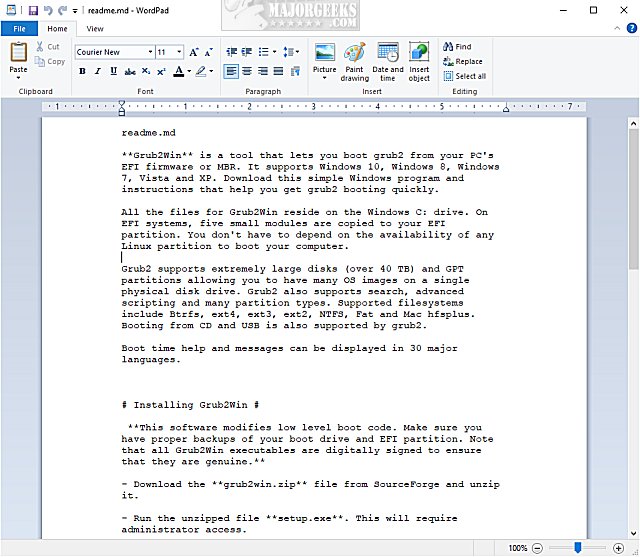
One of the simplest ways to describe an MD file is a simplified text document with HTML elements. If you want to add a bold font, you would use two asterisks before and after the text. The format isn't used frequently, and most users can get more done easier with NotePad or WordPad.
If you have an MD file that won't open, you can use NotePad, WordPad, or your favorite text editor because the Markdown Documentation has been around long enough that it is widely supported.
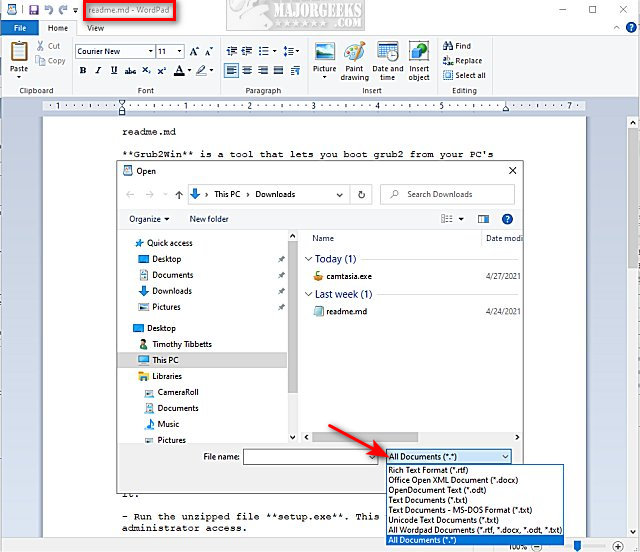
If an MD file does not appear, you can usually select "All Documents" and open the file.
Similar:
How to Add 'Open With Notepad' Context Menu
How to Automatically Add Date and Time to Notepad Documents
How to Change Font Size, Color, and Style in Notepad in Windows 10
How to Find or Replace Text in Notepad or WordPad
comments powered by Disqus
MD is the name for Markdown Documentation. The most common use for most end-users is a readme.md file.
One of the simplest ways to describe an MD file is a simplified text document with HTML elements. If you want to add a bold font, you would use two asterisks before and after the text. The format isn't used frequently, and most users can get more done easier with NotePad or WordPad.
If you have an MD file that won't open, you can use NotePad, WordPad, or your favorite text editor because the Markdown Documentation has been around long enough that it is widely supported.
If an MD file does not appear, you can usually select "All Documents" and open the file.
Similar:
comments powered by Disqus
