


Review: Oculus Quest Standalone Virtual Reality
By Timothy Tibbettson 06/15/2023 |
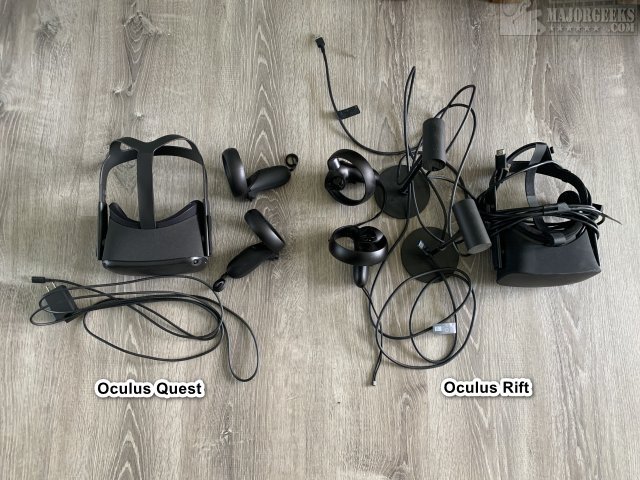
Oculus has released the Quest, a virtual reality headset that does not require a computer or sensors. We've had so much fun with our Oculus Rift (watching friends get queasy), we had to have the Quest. So, how does the Quest stack up without the need for a computer or sensors?
The Quest is available from most electronics retailers. We purchased ours at a brick and mortar Best Buy because we didn't want to wait. The Quest now follows the Apple model of purchasing either a 64GB ($399) or 128GB ($499), and we're not too thrilled with this model. We opted for the 128GB model because we play a lot of games, and we're concerned about running out of space. That said, it's a shame that the memory isn't upgradeable later for those who opted to buy the 64GB version.
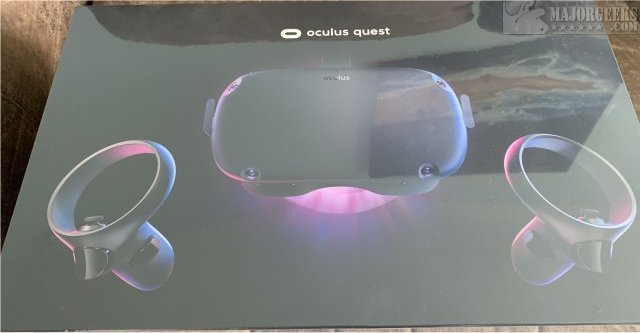
When unboxing the Quest, we found the experience to be pretty neat because there are no sensors or computers required making the unboxing as easy as plugging in the headset and putting the batteries in the controllers. You can play with the headset plugged in if you don't want to wait.
Next, you need to download the Oculus app for Android or iOS. The app walks you through the steps of setting up the Quest. You can browse apps and games through the phone and download them on the Quest. On the first use, you have to do the tutorial. We're not sure why there's no option to bypass the tutorial. As a seasoned user, we just wanted to jump right into our games. Also, we thought the Rift had a much more interesting tutorial.
We were able to log in with our preexisting Oculus accounts, and some games we already owned were available, and our purchases, friends list, avatar and everything else was how we left it with the Rift. That said, some developers are not participating in porting their games to the Quest, so you may need to repurchase some games, and at the time of this review, some games that are available on the Rift, aren't available for the Quest.
The Quest headset feels heavier than the Rift, and other people we tested with felt the same way.
As we reached for the controllers, we thought the hands looked an awful lot like ours before we remembered that those are our hands, because of the cameras. Duh. Coming from a Rift, of course, we're used to seeing default hands without arms, for example. That was an excellent "wow" moment for us.
That reminds us, people are not to scale. As we mentioned, your hands and arms are smaller, but that's not a big deal until you start watching videos. We watched a Brock Lesnar WWE match. Brocks a big guy but not in the videos. So, while the VR experience of watching a match is cool, it was just weird. We then watched some Monster Jam, and Dennis Anderson talks to you, but once again, the scale is so off it's distracting.
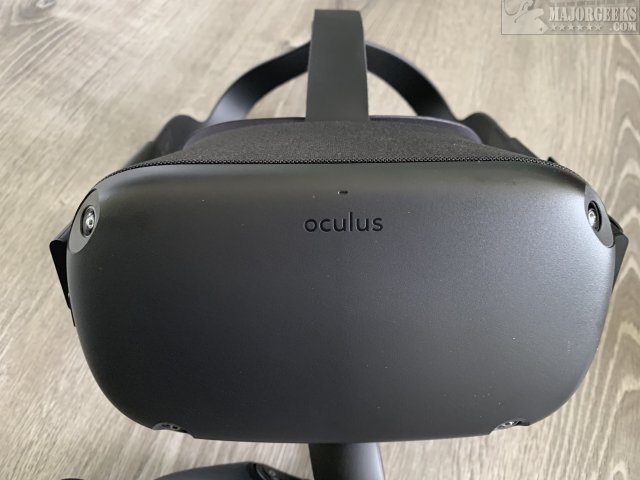
Much of the Oculus headset will be familiar to those who have used one before with some noticeable differences. You can still adjust the glasses for the best view, but there is also a volume controller and headphone jacks. Visually, the headset looks identical, again, with some tweaks. The cameras are something you hadn't seen before.
The controllers are also different in design while leaving the buttons in the same place.
Once you complete the setup, you can download some games. Oculus offers freeware and shareware games. Robo Recall is the perfect, free game to try first. Robo Recall has an excellent intro that you must see while allowing users to try a relatively simple yet fun game for their first time. Also, Robo Recall is considered comfortable, so most people won't feel queasy playing it.
You still have to "draw" a play area, so you don't bump into a wall of furniture. One issue we had was that the Quest wants a larger play area. Using a small bedroom as an office, we don't have the room to play and had to use our living room. Another interesting addition is the ability to walk outside of your play area and let the Quest know that you intentionally left your area to have a seat, for example.
There are many games to try that we can recommend for new players. Poker Stars is excellent if you like poker. There are a few other sports games, and don't miss the Appolo space mission. At the time of this review, No Limits Rollercoasters was not on the Quest, but if it is, download it and get ready to get queasy! For a casual or social experience, look into games like Rec Room where you can play games, interact, and relax while you get used to VR.
Summary
Of course, one always looks to the end of a review for a summary, and here are our thoughts.
Oculus has managed to tweak just about everything over the years, but you're still a beta tester because virtual reality is always evolving. We ran into some bugs in many games, some more annoying than others. Game quality, stability, and graphics vary, but Virtual Reality is all about the WOW factor.
The game shortage is, was, and will remain an issue. Game developers need to make games that can work with the Quest hardware meaning some developers can't get their game to work on the current Quest hardware. We discussed being early in the VR world, and this is yet another shortcoming.
Of course, we can expect Oculus to release a new, better Quest model every year or two, similar to smartphones and consoles. That's not a bad thing because you don't need a smartphone, PC, or console to use the Quest. However, the Quest needs to be better than the competition to sway people to buy it, and in its current state, the available games are lacking.
If you're a gamer, geek, haven't tried Virtual Reality, don't have a gaming PC, but do have $500 to spend, then you need the Oculus Quest.
If you have any questions, leave a comment, and we'll even update the review if needed.
Similar:
Review - Oculus Rift S
Oculus Rift - Your Antivirus Software Blocked Installation
How to Fix Oculus Rift Stuck on Three Dots Loading
How to Fix 'Oculus Rift Continue Setup in VR' Black Screen
Error: Can't Reach Oculus Runtime Service
comments powered by Disqus
The Quest is available from most electronics retailers. We purchased ours at a brick and mortar Best Buy because we didn't want to wait. The Quest now follows the Apple model of purchasing either a 64GB ($399) or 128GB ($499), and we're not too thrilled with this model. We opted for the 128GB model because we play a lot of games, and we're concerned about running out of space. That said, it's a shame that the memory isn't upgradeable later for those who opted to buy the 64GB version.
When unboxing the Quest, we found the experience to be pretty neat because there are no sensors or computers required making the unboxing as easy as plugging in the headset and putting the batteries in the controllers. You can play with the headset plugged in if you don't want to wait.
Next, you need to download the Oculus app for Android or iOS. The app walks you through the steps of setting up the Quest. You can browse apps and games through the phone and download them on the Quest. On the first use, you have to do the tutorial. We're not sure why there's no option to bypass the tutorial. As a seasoned user, we just wanted to jump right into our games. Also, we thought the Rift had a much more interesting tutorial.
We were able to log in with our preexisting Oculus accounts, and some games we already owned were available, and our purchases, friends list, avatar and everything else was how we left it with the Rift. That said, some developers are not participating in porting their games to the Quest, so you may need to repurchase some games, and at the time of this review, some games that are available on the Rift, aren't available for the Quest.
The Quest headset feels heavier than the Rift, and other people we tested with felt the same way.
As we reached for the controllers, we thought the hands looked an awful lot like ours before we remembered that those are our hands, because of the cameras. Duh. Coming from a Rift, of course, we're used to seeing default hands without arms, for example. That was an excellent "wow" moment for us.
That reminds us, people are not to scale. As we mentioned, your hands and arms are smaller, but that's not a big deal until you start watching videos. We watched a Brock Lesnar WWE match. Brocks a big guy but not in the videos. So, while the VR experience of watching a match is cool, it was just weird. We then watched some Monster Jam, and Dennis Anderson talks to you, but once again, the scale is so off it's distracting.
Much of the Oculus headset will be familiar to those who have used one before with some noticeable differences. You can still adjust the glasses for the best view, but there is also a volume controller and headphone jacks. Visually, the headset looks identical, again, with some tweaks. The cameras are something you hadn't seen before.
The controllers are also different in design while leaving the buttons in the same place.
Once you complete the setup, you can download some games. Oculus offers freeware and shareware games. Robo Recall is the perfect, free game to try first. Robo Recall has an excellent intro that you must see while allowing users to try a relatively simple yet fun game for their first time. Also, Robo Recall is considered comfortable, so most people won't feel queasy playing it.
You still have to "draw" a play area, so you don't bump into a wall of furniture. One issue we had was that the Quest wants a larger play area. Using a small bedroom as an office, we don't have the room to play and had to use our living room. Another interesting addition is the ability to walk outside of your play area and let the Quest know that you intentionally left your area to have a seat, for example.
There are many games to try that we can recommend for new players. Poker Stars is excellent if you like poker. There are a few other sports games, and don't miss the Appolo space mission. At the time of this review, No Limits Rollercoasters was not on the Quest, but if it is, download it and get ready to get queasy! For a casual or social experience, look into games like Rec Room where you can play games, interact, and relax while you get used to VR.
Summary
Of course, one always looks to the end of a review for a summary, and here are our thoughts.
Oculus has managed to tweak just about everything over the years, but you're still a beta tester because virtual reality is always evolving. We ran into some bugs in many games, some more annoying than others. Game quality, stability, and graphics vary, but Virtual Reality is all about the WOW factor.
The game shortage is, was, and will remain an issue. Game developers need to make games that can work with the Quest hardware meaning some developers can't get their game to work on the current Quest hardware. We discussed being early in the VR world, and this is yet another shortcoming.
Of course, we can expect Oculus to release a new, better Quest model every year or two, similar to smartphones and consoles. That's not a bad thing because you don't need a smartphone, PC, or console to use the Quest. However, the Quest needs to be better than the competition to sway people to buy it, and in its current state, the available games are lacking.
If you're a gamer, geek, haven't tried Virtual Reality, don't have a gaming PC, but do have $500 to spend, then you need the Oculus Quest.
If you have any questions, leave a comment, and we'll even update the review if needed.
Similar:
Review - Oculus Rift S
Oculus Rift - Your Antivirus Software Blocked Installation
How to Fix Oculus Rift Stuck on Three Dots Loading
How to Fix 'Oculus Rift Continue Setup in VR' Black Screen
Error: Can't Reach Oculus Runtime Service
comments powered by Disqus
