


What Is the Rempl Folder and Can I Delete It?
By Timothy Tibbettson 06/15/2023 |
Recently, while cleaning up our computer before installing a new hard drive, we discovered a folder in Program Files called rempl. So, what is this, and can you delete it?
Executables inside this folder may contain disktoast.exe, rempl.exe, remsh.exe, WaaSMedic.exe, Sedlauncher.exe, Sedsvc.exe, and osrrsb. There is also a Logs folder. We say "may contain" because this issue first appeared in November 2018, and the folder is still found on many computers.
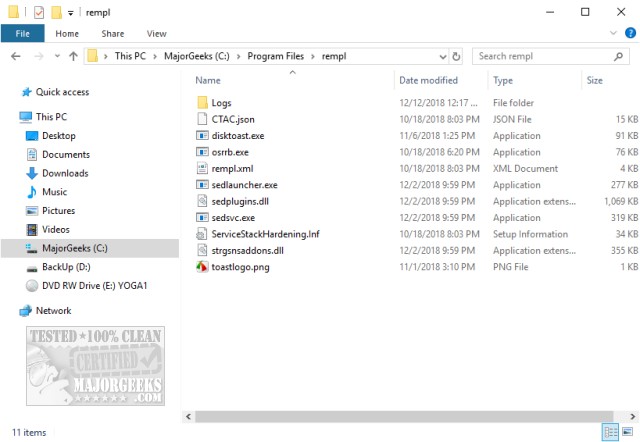
You'll notice the files are all digitally signed by Microsoft. They are files being used for an upcoming
Feature Update. If you've got time to kill here's the lengthy explanation from Microsoft.
Can I Delete the Folder?
Nothing makes us happier than breaking things (sorry ladies, we never grow up), so we deleted the folder in our Virtual Machine.
Here's what happened.
We rebooted, and the folder was still gone.
We ran Windows Updates, and the folder was still gone.
Not content with one test, we deleted the rempl folder on our daily work computer. The results were the same.
As far as we can tell, you can delete the rempl folder if you like. Keep in mind that it only uses 21MB, so if you know a feature update is a month or two away, you might wait until after that update is applied.
We've posted many guides on fixing broken Windows Updates, and many times we have you delete Windows Update files. This is because if you remove files for a botched Windows Update, Windows will redownload the next time Windows Updates runs. Our assumption here is that if these files and folders are needed again later, they will be restored. Of course, we'd create a System Restore point to be safe.
Similar:
How-To Delete Pending Windows Updates
How to Block or Defer Windows 10 Major Updates
How to Uninstall Windows 10 Updates
Configure When and How Windows Updates Are Delivered
How-to Change Rollback Days for Windows 10 Feature Upgrades
comments powered by Disqus
Executables inside this folder may contain disktoast.exe, rempl.exe, remsh.exe, WaaSMedic.exe, Sedlauncher.exe, Sedsvc.exe, and osrrsb. There is also a Logs folder. We say "may contain" because this issue first appeared in November 2018, and the folder is still found on many computers.
You'll notice the files are all digitally signed by Microsoft. They are files being used for an upcoming
Feature Update. If you've got time to kill here's the lengthy explanation from Microsoft.
Can I Delete the Folder?
Nothing makes us happier than breaking things (sorry ladies, we never grow up), so we deleted the folder in our Virtual Machine.
Here's what happened.
We rebooted, and the folder was still gone.
We ran Windows Updates, and the folder was still gone.
Not content with one test, we deleted the rempl folder on our daily work computer. The results were the same.
As far as we can tell, you can delete the rempl folder if you like. Keep in mind that it only uses 21MB, so if you know a feature update is a month or two away, you might wait until after that update is applied.
We've posted many guides on fixing broken Windows Updates, and many times we have you delete Windows Update files. This is because if you remove files for a botched Windows Update, Windows will redownload the next time Windows Updates runs. Our assumption here is that if these files and folders are needed again later, they will be restored. Of course, we'd create a System Restore point to be safe.
Similar:
How-To Delete Pending Windows Updates
How to Block or Defer Windows 10 Major Updates
How to Uninstall Windows 10 Updates
Configure When and How Windows Updates Are Delivered
How-to Change Rollback Days for Windows 10 Feature Upgrades
comments powered by Disqus
