


Display Driver Uninstaller (DDU) 18.1.5.6
|
Author:
Wagnard
Date: 07/17/26 Size: 2 MB License: Freeware Requires: 11|10|8|7 Downloads: 647594 times  TIP:
Click Here to Repair or
TIP:
Click Here to Repair orRestore Missing Windows Files |
Download (EXE) Download (Portable) Download@MajorGeeks Download@MajorGeeks
|
MajorGeeks: Setting the standard for editor-tested, trusted, and secure downloads since 2002. |
 Avast Free Antivirus Worried about finance scams?
Get free antivirus with AI-powered online scam detection Download Free!
Display Driver Uninstaller (DDU): The Driver Cleaner You've Been Waiting For
Let's face it: uninstalling graphics drivers on your PC isn't always as simple as clicking a button. Sometimes, bits of old drivers stick around, clogging up your system like digital dust bunnies and causing all sorts of headaches when you're trying to upgrade or switch brands. That’s where Display Driver Uninstaller (DDU) comes in—a handy tool that gets the job done *right* the first time.
What Is DDU?
Display Driver Uninstaller, developed by the tech-savvy folks at Wagnard, is a lightweight utility that digs deep into your system to fully remove any remnants of AMD, Nvidia, Intel, and even some Realtek audio drivers. Whether you want to troubleshoot driver headaches, switch GPU brands, or prep your system for a clean graphics driver install, DDU is the tool for the job.
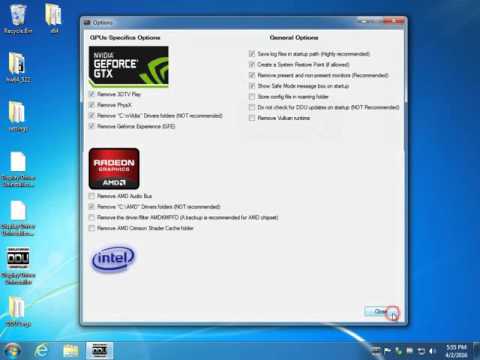
After running Display Driver Uninstaller, the program will make it as if you are about to install a new video driver on a fresh, clean install of Windows. Here is a video tutorial:
▶
Why You'll Love It
Here's what makes DDU worth keeping in your digital toolbox:
Thorough Clean-Up:
Unlike the standard uninstall process in Windows, which often leaves stray files, registry entries, and folders behind, DDU scrubs your system clean. Think of it as hitting the refresh button for your GPU drivers.
Safe and Controlled Process:
Worried about screwing something up? DDU has built-in safeguards, like automatically reminding you to create a new system restore point. It’s a lifesaver if something unexpected happens—though let’s be real, it’s rare with DDU.
Optimized for Fresh Installs:
After running DDU, your system is driver-free, like a blank slate. This clean environment is perfect for installing new or updated drivers without the compatibility issues or leftover clutter that can cause performance quirks or crashes.
Cross-Compatible and Secure:
Supporting Windows 7 through Windows 11, DDU is compatible with older and newer systems alike. It's also highly recommended that you run it in Safe Mode for maximum stability during operation. (Don’t worry, the process is straightforward!)
How It Solves Your Problems
● Switching GPU Brands? No Problem! Moving from Nvidia to AMD (or vice versa)? DDU ensures leftover driver files don’t mess with your shiny new graphics card.
● Fixing Installation Hiccups: Having trouble installing fresh drivers because old versions keep popping up like unwanted guests? DDU takes care of them so you can start fresh.
● Stubborn Drivers Begone: Got a driver that refuses to uninstall with the standard Windows method? DDU’s Force Removal option is here to save the day.
● Audio Support Too: Yes, DDU even cleans out leftovers from Realtek and Soundblaster drivers to help you avoid those puzzling sound issues.
Pro Tips for Using DDU
● Use Safe Mode: Running DDU in Safe Mode disables unnecessary processes, ensuring a smoother operation.
● Disconnect from the Internet: This prevents Windows from sneakily downloading and reinstalling default drivers while you clean up.
● Backup First: Although rare, if anything goes wrong, you’ll want a system restore point or backup ready.
● Do NOT Overuse It: As incredible as DDU is, it's not something you need for every driver update. It’s a powerful tool best used when things are messy or you’re making major GPU changes.
Geek Verdict: A Must-Have Utility for Every Tech Enthusiast
Display Driver Uninstaller (DDU) doesn't just clean house—it bulldozes through any driver-related issues standing between you and a perfectly running GPU. Whether you're a gamer, video editor, or simply someone who loves their PC to run glitch-free, DDU is a go-to solution. It's simple to use, effective, and—best of all—free!
Save yourself the frustration of faulty driver installs and lingering traces of old files. Give your PC the fresh start it deserves with DDU, and thank us later.
Verdict: Download it now and breathe easy!
Similar:
● How to Download the Latest Drivers for Windows
● How-To Backup and Restore Your Drivers
● How-To Stop Windows Updates From Downloading Drivers on Windows 10 & 11
● What is Windows Hardware Quality Labs or WHQL?
● How to Find a Missing NVIDIA Control Panel and Restore the Context Menu or Tray Icon
Editor's Note:
If you use the portable version of DDU and want to preserve your settings when you download a new version of DDU, after extracting the new portable version, go into the previous version that you had and copy the Settings.xml file from the Settings folder in DDU and paste it in the settings folder in the new portable edition.
The author accepts donations on their homepage and in-app.
MajorGeeks download is the portable version.
 Screenshot for Display Driver Uninstaller (DDU)
Top Downloads In Driver Utilities
 Display Driver Uninstaller (DDU) 18.1.5.6 [ 2026-07-18 01:38:04 | 2 MB | Freeware | 11|10|8|7 | 5 ] Double Driver 4.10 [ 2010-08-10 13:32:51 | 2.06 MB | Freeware | 10|8|7 | 5 ] PCI-Z 2.0 [ 2017-07-17 22:27:22 | 1.12 MB | Freeware | Win 10 / 8 / 7 / Vista / XP | 5 ] Microsoft .NET Framework Cleanup Tool 05-17-2018 [ 2018-05-18 06:47:40 | 262 KB | Freeware | Win 10 / 8 / 7 / Vista | 5 ] WhoCrashed Free Home Edition 7.10 [ 2024-10-22 09:07:31 | 11 MB | Freemium | 11|10|8|7 | 5 ]
 Tactical Briefings
Comment Rules & Etiquette - We welcome all comments from our readers, but any comment section requires some moderation. Some posts are auto-moderated to reduce spam, including links and swear words. When you make a post, and it does not appear, it went into moderation. We are emailed when posts are marked as spam and respond ASAP. Some posts might be deleted to reduce clutter. Examples include religion, politics, and comments about listing errors (after we fix the problem and upvote your comment). Finally, be nice. Thank you for choosing MajorGeeks.

© 2000-2026 MajorGeeks.com
Powered by Contentteller® CMS System