


Open-Shell 4.4.202 Pre-Release
|
Author:
Passionate Coder
Date: 10/13/26 Size: 10 MB License: Open Source Requires: 11|10|8|7 Downloads: 1036 times  TIP:
Click Here to Repair or
TIP:
Click Here to Repair orRestore Missing Windows Files |
 Download@MajorGeeks Download@MajorGeeks
|
MajorGeeks: Setting the standard for editor-tested, trusted, and secure downloads since 2002. |
 Avast Free Antivirus Worried about finance scams?
Get free antivirus with AI-powered online scam detection Download Free!
Open-Shell, previously known as Classic-Start, lets users personalize their Start Menu by restoring classic layouts reminiscent of Windows 7, 8.1, and even XP. This versatile tool seamlessly integrates with both Windows 10 and Windows 11, transforming the default Start Menu into one that reflects individual preferences. With Open-Shell, users can enhance their desktop experience, making it more familiar and efficient according to their needs.
The newer Start Menus in Windows can be perceived as cluttered and unintuitive by some users. Open-Shell is a software solution that addresses this issue by restoring a classic-style Start Menu while incorporating updated tools and streamlined navigation. This enhancement can significantly improve productivity and make multitasking easier. For those who miss the traditional Start Button, Open-Shell brings it back. Additionally, the software allows users to conveniently access their pinned applications and frequently used documents in one central location. Overall, Open-Shell can transform the experience of navigating Windows from a potentially cumbersome task into a more user-friendly and efficient process.
Useful Features to Bring You Back:
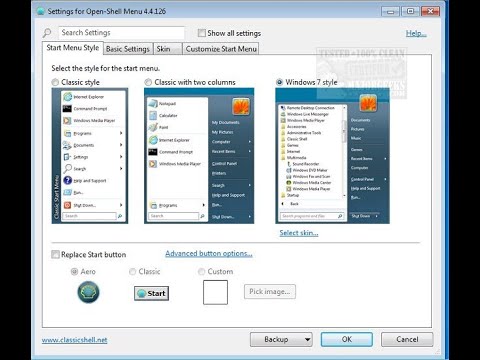
● Classic Start Menu Styles: Choose from various templates, including Windows 7 or earlier styles. It's like picking your favorite outfit for your desktop.
● Custom Skins and Visual Tweaks: Spiff up your Start Menu with custom skins, icon styles, transparency effects, and layouts galore.
● A Smarter Search Bar: Quickly locate programs, files, or settings with a highly responsive, intuitive search functionality.
● Quick Access: Pin your most-used apps, documents, or settings right where you need them—fewer clicks, more productivity.
● Explorer Enhancements: More than the Start Menu. Add toolbars, return the Status Bar, and get file size info without over-complicating your Explorer.
● Even Supports Windows 11: Bring a traditional Windows vibe to even the latest iterations of Microsoft's OS.
Open-Shell is a tool designed to enhance the functionality and appearance of your Windows PC. It addresses common frustrations users face with the standard Start Menu in Windows 10 and 11. By simplifying navigation, Open-Shell allows users to access essential features more efficiently without wading through multiple menus.
One of the standout aspects of Open-Shell is its customizable interface, enabling users to tailor their experience to suit their preferences. This open-source software is completely free, ensuring that users are not subjected to ads or hidden fees, and it benefits from ongoing updates and contributions from an active development community.
Whether you are a casual user looking for a more intuitive setup, a veteran seeking a nostalgic menu experience, or a productivity enthusiast aiming to streamline your workflow, Open-Shell offers straightforward customization options to help you organize your desktop in a way that meets your individual needs.
Open-Shell seamlessly combines the comfort of the familiar with enhanced functionality, empowering modern Windows users to harness the tools and layouts they know and love. It's an ideal solution for those eager to boost productivity, personalize their experience, or embrace the nostalgia of the Windows 7 Start Menu, without sacrificing the advantages of contemporary operating system performance. With its lightweight design, extensive customization options, and ongoing community-driven updates, Open-Shell feels like an essential upgrade rather than just an add-on.
The current stable version is also available.
Similar:
● How to Enable or Disable Windows 10 & 11 Full Screen Start Menu
● How to Customize the Windows 10 & 11 Start Menu
● How to Show More Tiles in the Windows 10 & 11 Start Menu
● How to Collapse or Hide Apps List in Windows 10 & 11 Start Menu
Why Choose Open-Shell?
The newer Start Menus in Windows can be perceived as cluttered and unintuitive by some users. Open-Shell is a software solution that addresses this issue by restoring a classic-style Start Menu while incorporating updated tools and streamlined navigation. This enhancement can significantly improve productivity and make multitasking easier. For those who miss the traditional Start Button, Open-Shell brings it back. Additionally, the software allows users to conveniently access their pinned applications and frequently used documents in one central location. Overall, Open-Shell can transform the experience of navigating Windows from a potentially cumbersome task into a more user-friendly and efficient process.
Useful Features to Bring You Back:
● Classic Start Menu Styles: Choose from various templates, including Windows 7 or earlier styles. It's like picking your favorite outfit for your desktop.
● Custom Skins and Visual Tweaks: Spiff up your Start Menu with custom skins, icon styles, transparency effects, and layouts galore.
● A Smarter Search Bar: Quickly locate programs, files, or settings with a highly responsive, intuitive search functionality.
● Quick Access: Pin your most-used apps, documents, or settings right where you need them—fewer clicks, more productivity.
● Explorer Enhancements: More than the Start Menu. Add toolbars, return the Status Bar, and get file size info without over-complicating your Explorer.
● Even Supports Windows 11: Bring a traditional Windows vibe to even the latest iterations of Microsoft's OS.
Open-Shell Provides A Little Something For Everyone
Open-Shell is a tool designed to enhance the functionality and appearance of your Windows PC. It addresses common frustrations users face with the standard Start Menu in Windows 10 and 11. By simplifying navigation, Open-Shell allows users to access essential features more efficiently without wading through multiple menus.
One of the standout aspects of Open-Shell is its customizable interface, enabling users to tailor their experience to suit their preferences. This open-source software is completely free, ensuring that users are not subjected to ads or hidden fees, and it benefits from ongoing updates and contributions from an active development community.
Whether you are a casual user looking for a more intuitive setup, a veteran seeking a nostalgic menu experience, or a productivity enthusiast aiming to streamline your workflow, Open-Shell offers straightforward customization options to help you organize your desktop in a way that meets your individual needs.
Geek Verdict
Open-Shell seamlessly combines the comfort of the familiar with enhanced functionality, empowering modern Windows users to harness the tools and layouts they know and love. It's an ideal solution for those eager to boost productivity, personalize their experience, or embrace the nostalgia of the Windows 7 Start Menu, without sacrificing the advantages of contemporary operating system performance. With its lightweight design, extensive customization options, and ongoing community-driven updates, Open-Shell feels like an essential upgrade rather than just an add-on.
The current stable version is also available.
▶
Similar:
● How to Enable or Disable Windows 10 & 11 Full Screen Start Menu
● How to Customize the Windows 10 & 11 Start Menu
● How to Show More Tiles in the Windows 10 & 11 Start Menu
● How to Collapse or Hide Apps List in Windows 10 & 11 Start Menu
 Screenshot for Open-Shell
Top Downloads In Start Menu And Taskbar
 Start Menu 8 6.0.0.2 [ 2021-07-16 06:06:44 | 11.8 MB | Freeware | 10|8 | 5 ] WinMetro 1.2.0.702 [ 2018-04-15 23:13:33 | 7.55 MB | Freeware | Win 8 / Win 7 / Vista / XP | 5 ] Open-Shell (Formerly Classic-Start) 4.4.198 [ 2026-05-17 08:21:19 | 8 MB | Open Source | 11|10|8|7 | 5 ] 7+ Taskbar Tweaker 5.15.4 [ 2025-12-25 02:43:47 | 2 MB | Open Source | 11|10|8|7 | 5 ] StartAllBack 3.9.28 [ 2026-10-12 21:06:55 | 2 MB | Shareware $4.99 | 11 | 4 ]
 Tactical Briefings
Comment Rules & Etiquette - We welcome all comments from our readers, but any comment section requires some moderation. Some posts are auto-moderated to reduce spam, including links and swear words. When you make a post, and it does not appear, it went into moderation. We are emailed when posts are marked as spam and respond ASAP. Some posts might be deleted to reduce clutter. Examples include religion, politics, and comments about listing errors (after we fix the problem and upvote your comment). Finally, be nice. Thank you for choosing MajorGeeks.

© 2000-2026 MajorGeeks.com
Powered by Contentteller® CMS System