


Is FloC enabled and How to Opt-Out in Google Chrome
By Timothy Tibbettson 06/15/2023 |
Google is currently testing FloC (Federated Learning of Cohorts), designed to replace cookies while allowing the process to be more secure. Here's how to check for and disable FloC.
FloC is a good idea in theory. Rather than show individuals ads, FloC will show advertisements to thousands of users with the same interests. That would allow advertisers to see the effectiveness of their ads without tracking them individually.
No one is sure if FloC will be widespread. Typically, Google has the power and size to make a major change in the industry, but they also have had many failures. There's a lot of discussion about FloC, with the Electronic Frontier Foundation and many major web developers not convinced that it will work.
Video tutorial:
Regardless, you might be a guinea pig for FloC and not even know it. You can find out by going to Am I FloCed.
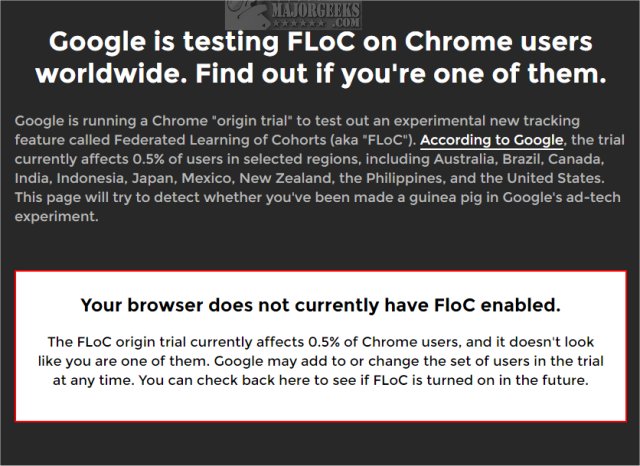
At the time of this article, only 5% of users have FloC enabled, but the settings for it are on by default meaning FloC can be enabled at any time, and you wouldn't know it.
Click on the three dots in the top-right corner to access Google Chrome Settings.
Click on Privacy & security. Click on Privacy Sandbox.
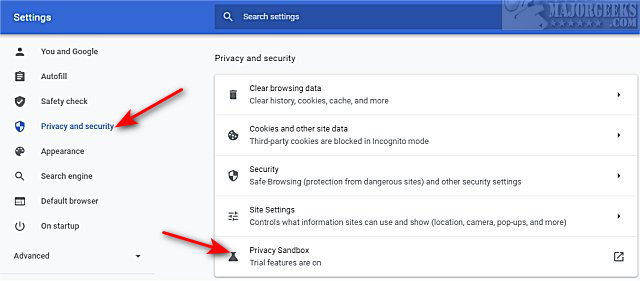
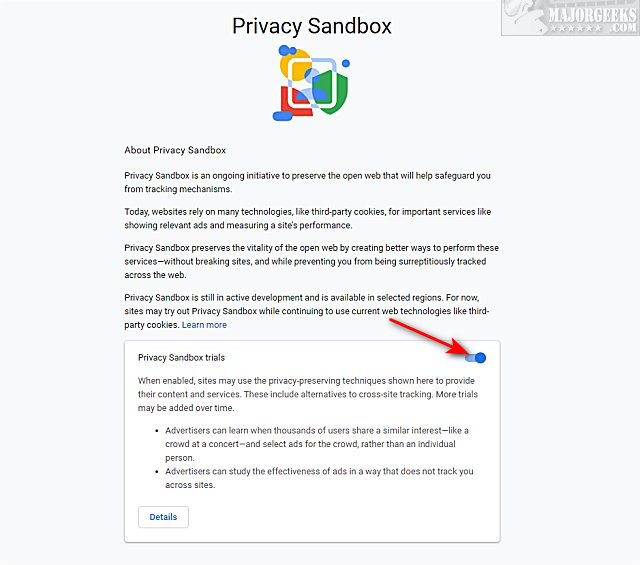
Look for Privacy Sandbox trials and toggle that off (gray).
Tell your friends by sharing this meme or using tinyurl.com/floced

Similar:
How to Auto-Delete Your Web and App Activity in Google Chrome
How to Prevent Google Chrome From Storing Your Browser History
How to Delete Your YouTube Watch and Search History
How to Always Start Google Chrome in Incognito Mode in Windows 10
How to Stop Google Chrome Crash Reports Sending Personal Information
comments powered by Disqus
FloC is a good idea in theory. Rather than show individuals ads, FloC will show advertisements to thousands of users with the same interests. That would allow advertisers to see the effectiveness of their ads without tracking them individually.
No one is sure if FloC will be widespread. Typically, Google has the power and size to make a major change in the industry, but they also have had many failures. There's a lot of discussion about FloC, with the Electronic Frontier Foundation and many major web developers not convinced that it will work.
Regardless, you might be a guinea pig for FloC and not even know it. You can find out by going to Am I FloCed.
At the time of this article, only 5% of users have FloC enabled, but the settings for it are on by default meaning FloC can be enabled at any time, and you wouldn't know it.
Click on the three dots in the top-right corner to access Google Chrome Settings.
Click on Privacy & security. Click on Privacy Sandbox.
Look for Privacy Sandbox trials and toggle that off (gray).
Tell your friends by sharing this meme or using tinyurl.com/floced
Similar:
comments powered by Disqus
