


How to Add or Remove Hibernate in Windows 10 Power Menu
By Timothy Tibbettson 06/15/2023 |
When you press the Start Menu, Win+X, or Ctrl+Alt+Delete, you have different options, including Shut down, Restart, Sleep, Lock, and Hibernate. In this tutorial, we show you how to remove Hibernate from the Windows 10 Power Menu.
We can add or remove the Hibernate option in numerous ways, but using a registry file or the Control Panel makes it simple.
Hibernation must be enabled to show up on the Power Menu.
Video Tutorial:
1: How to Add or Remove Hibernate in Windows 10 Power Menu With Registry Files
Download Add or Remove Hibernate in Windows 10 Power Menu, and extract the two files.
Remove Hibernate in Windows 10 Power Menu.reg
Add Hibernate in Windows 10 Power Menu.reg
Double-click Remove Hibernate in Windows 10 Power Menu.reg or Add Hibernate in Windows 10 Power Menu.reg to Add or Remove Sleep in Windows 10 Power Menu.
Click Yes when prompted by User Account Control.
Click Yes when prompted by Registry Editor.
Click OK when prompted by the Registry Editor.
This tweak is included as part of MajorGeeks Registry Tweaks.
2: How to Add or Remove Hibernate in Windows 10 Power Menu With Control Panel
Open the classic Control Panel.
Click on Power Options. If you don't see Power Options, click on Small icons or Large icons near the top-right.
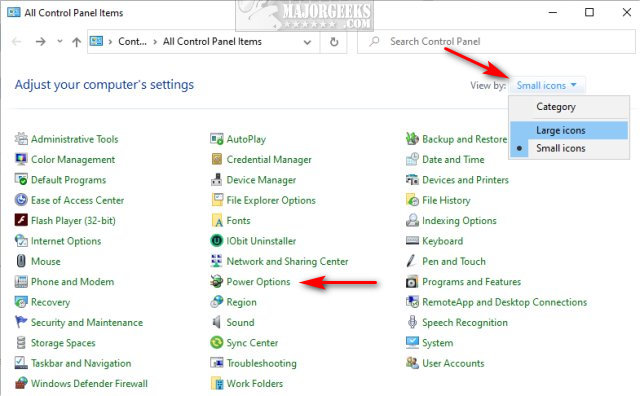
On the left, click on Change what the power buttons do.
Click on Change settings that are currently unavailable.
Under Shutdown settings, check, or uncheck the Hibernate box.
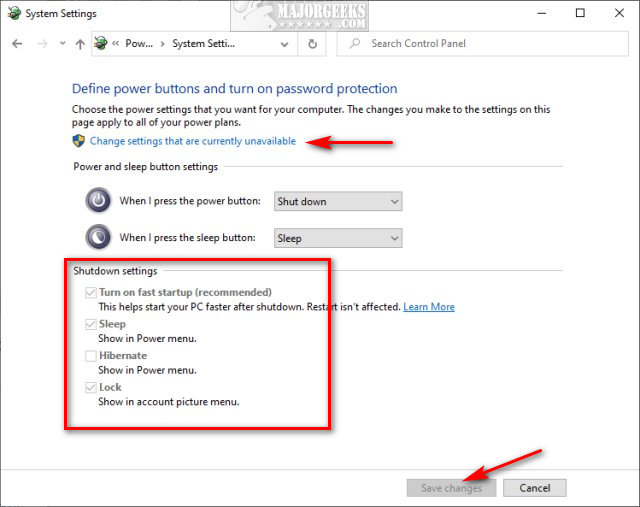
Click on Save changes.
Similar:
How to Add or Remove Sleep in Windows 10 Power Menu
How to Add or Remove Lock From the Account Picture Menu in Windows 10
How to Restore Missing Power Plans or the Add High Performance and Ultimate Performance Power Plans on Windows 10
How to Add or Remove 'Maximum processor frequency' in Windows 10
How to Create a Power Plan in Windows
comments powered by Disqus
We can add or remove the Hibernate option in numerous ways, but using a registry file or the Control Panel makes it simple.
Hibernation must be enabled to show up on the Power Menu.
1: How to Add or Remove Hibernate in Windows 10 Power Menu With Registry Files
Download Add or Remove Hibernate in Windows 10 Power Menu, and extract the two files.
Remove Hibernate in Windows 10 Power Menu.reg
Add Hibernate in Windows 10 Power Menu.reg
Double-click Remove Hibernate in Windows 10 Power Menu.reg or Add Hibernate in Windows 10 Power Menu.reg to Add or Remove Sleep in Windows 10 Power Menu.
Click Yes when prompted by User Account Control.
Click Yes when prompted by Registry Editor.
Click OK when prompted by the Registry Editor.
This tweak is included as part of MajorGeeks Registry Tweaks.
2: How to Add or Remove Hibernate in Windows 10 Power Menu With Control Panel
Open the classic Control Panel.
Click on Power Options. If you don't see Power Options, click on Small icons or Large icons near the top-right.
On the left, click on Change what the power buttons do.
Click on Change settings that are currently unavailable.
Under Shutdown settings, check, or uncheck the Hibernate box.
Click on Save changes.
Similar:
comments powered by Disqus
