


How to Delete Facebook Posts in Bulk With Chrome or Firefox (Video)
By Timothy Tibbettson 07/12/2023 |
If you're anything like us, you've made plenty of dumb Facebook posts, and you'd like to delete them. There are thousands of articles incorrectly explaining how to do this, and we're guessing you've discovered that removing Facebook posts is not as simple as it should be. Here is the only way we know how using Google Chrome or Mozilla Firefox.
One of my favorite articles we found while browsing for a solution had a sub-headline that said: "It was hard." That's pretty funny. And most good comedy has a hint of truth to it. There is no simple way to delete your posts in bulk inside of Facebook. You can delete your posts one at a time by clicking on your User Name and then Activity Log, or you can use a web browser extension or addon.

Important Notes: Before proceeding, you should know that both of these methods are buggy. You can expect to run these extensions more than once, and your browser tabs will occasionally lock up. It's also time-consuming. If you have thousands or tens of thousands of posts, this could take days. Your best bet is to pick a point when your not using your computer and walk away while posts are deleted.
If you want to delete many years worth of posts, then you might want to try to delete one year at a time. For example, if you've been on Facebook for eight years then try deleting posts that are over seven years old. (7x365). If you try and delete everything, you can expect the scripts to fail.
For example, in our tests, it has been over 24 hours to delete everything we had older than five years old. That means we still have to repeat this for the last five years. Expect to waste some time here. The upshot to all of this is that we now hesitate before we like, post, or share anything.
Finally, people have asked me which method is better. We found the Firefox method to work a little better. Neither one is intuitive, but the Firefox method edges out the Chrome method.
Google Chrome
If you don't have Chrome, download it here and then download the Social Book Post Manager for Chrome.
For both of these methods, you need to log into Facebook, click on your username and then click on the Activity log.
Next, click on the extension icon and a window will appear with all of your options.
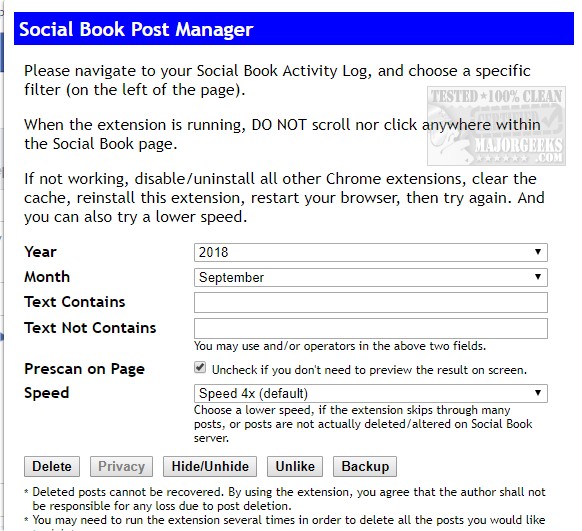
Choose the year(s), month(s) as well as specific text and more. By default, the speed is 4x, and we found faster speeds left more posts behind so we suggest you leave this alone. Click on Delete and wait. We haven't figured out what Privacy is for yet and Hide/Unhide isn't well explained.
Here is a video guide to explain how it works:
Mozilla Firefox
Of course, you need Mozilla Firefox first.
Next, download and install the Grease Monkey addon.
Finally, you need the Timeline Cleaner Script from ITSupportGuides.
As mentioned earlier, for both of these methods, you now need to log into Facebook, click on your username and then click on the Activity log.
You will now see everything you need to delete posts.
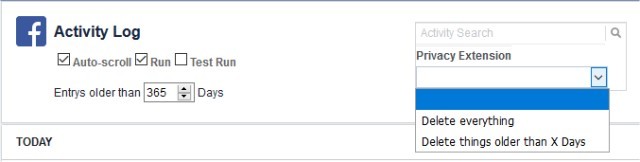
As you can see, the interface here is much simpler.
We hope you were able to clean up your Facebook the way you want it. While there are a few things you can change, we recommend you check auto-scroll, set the number of days as mentioned in the notes at the top of this article, and choose "Delete things older than X days" from the drop-down. Next, click on the Run checkbox and walk away while posts are deleted.
You might see a message stating that a web page is slowing down your browser. We left it alone, and it almost always continued deleting.
That's it! As we mentioned, it's not pretty, but these are the only way to delete many Facebook posts.
Similar:
How to Secure Your Facebook Account
How to Stop Facebook’s Targeted Advertising
The Truth About Facebook Ads
Sorry, This Content Isn't Available Right Now Facebook Error
How to Delete or Remove Third-Party Facebook Applications and Websites
How to Tell If Your Facebook Data Was Harvested by Cambridge Analytica
Manage or Block All Your Apps, Websites and Games That Facebook Can Access (Video)
How to Download All Your Facebook Data
comments powered by Disqus
One of my favorite articles we found while browsing for a solution had a sub-headline that said: "It was hard." That's pretty funny. And most good comedy has a hint of truth to it. There is no simple way to delete your posts in bulk inside of Facebook. You can delete your posts one at a time by clicking on your User Name and then Activity Log, or you can use a web browser extension or addon.
Important Notes: Before proceeding, you should know that both of these methods are buggy. You can expect to run these extensions more than once, and your browser tabs will occasionally lock up. It's also time-consuming. If you have thousands or tens of thousands of posts, this could take days. Your best bet is to pick a point when your not using your computer and walk away while posts are deleted.
If you want to delete many years worth of posts, then you might want to try to delete one year at a time. For example, if you've been on Facebook for eight years then try deleting posts that are over seven years old. (7x365). If you try and delete everything, you can expect the scripts to fail.
For example, in our tests, it has been over 24 hours to delete everything we had older than five years old. That means we still have to repeat this for the last five years. Expect to waste some time here. The upshot to all of this is that we now hesitate before we like, post, or share anything.
Finally, people have asked me which method is better. We found the Firefox method to work a little better. Neither one is intuitive, but the Firefox method edges out the Chrome method.
Google Chrome
If you don't have Chrome, download it here and then download the Social Book Post Manager for Chrome.
For both of these methods, you need to log into Facebook, click on your username and then click on the Activity log.
Next, click on the extension icon and a window will appear with all of your options.
Choose the year(s), month(s) as well as specific text and more. By default, the speed is 4x, and we found faster speeds left more posts behind so we suggest you leave this alone. Click on Delete and wait. We haven't figured out what Privacy is for yet and Hide/Unhide isn't well explained.
Here is a video guide to explain how it works:
Mozilla Firefox
Of course, you need Mozilla Firefox first.
Next, download and install the Grease Monkey addon.
Finally, you need the Timeline Cleaner Script from ITSupportGuides.
As mentioned earlier, for both of these methods, you now need to log into Facebook, click on your username and then click on the Activity log.
You will now see everything you need to delete posts.
As you can see, the interface here is much simpler.
We hope you were able to clean up your Facebook the way you want it. While there are a few things you can change, we recommend you check auto-scroll, set the number of days as mentioned in the notes at the top of this article, and choose "Delete things older than X days" from the drop-down. Next, click on the Run checkbox and walk away while posts are deleted.
You might see a message stating that a web page is slowing down your browser. We left it alone, and it almost always continued deleting.
That's it! As we mentioned, it's not pretty, but these are the only way to delete many Facebook posts.
Similar:
How to Secure Your Facebook Account
How to Stop Facebook’s Targeted Advertising
The Truth About Facebook Ads
Sorry, This Content Isn't Available Right Now Facebook Error
How to Delete or Remove Third-Party Facebook Applications and Websites
How to Tell If Your Facebook Data Was Harvested by Cambridge Analytica
Manage or Block All Your Apps, Websites and Games That Facebook Can Access (Video)
How to Download All Your Facebook Data
comments powered by Disqus
