


How to Tell If Your Facebook Data Was Harvested by Cambridge Analytica
By Timothy Tibbettson 06/30/2023 |
We all now know that Facebook has been harvesting data through Cambridge Analytica and the "This Is Your Digital Life" app. You might be wondering if you were affected and the good news is Facebook now can tell you with just one click.
To find out, just go to https://www.facebook.com/help/1873665312923476?helpref=search&sr=1&query=cambridge
This link is just a shortcut to typing in Cambridge in the search while at the Facebook Help Center.
You will automatically be notified if you were affected.
This is also a good time to Manage or Block All Your Apps, Websites and Games That Facebook Can Access.
Here's a screenshot of our results showing we're clean:
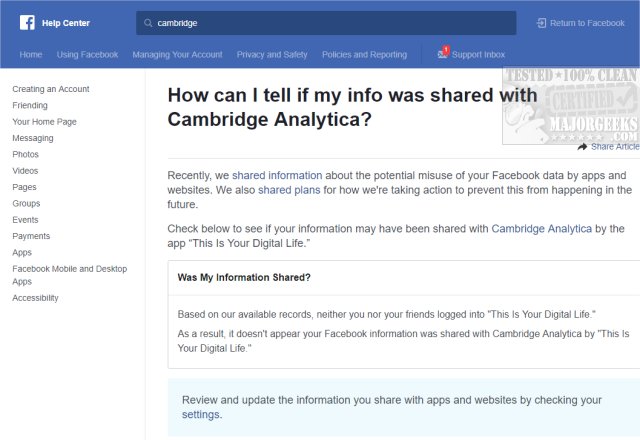
If you were affected, you'd be notified if you or a friend logged into the "This Is your Digital Life" app. Then you're informed that your public profile, page likes, date of birth, and current city were shared. Other possible information that could be exposed is mentioned including news feed, messages, timeline, posts, messages.
In other words, everything.
How did this happen?
In 2010, Facebook launched Open Graph for third-party apps. OpenGraph allowed external developers to reach out to Facebook users and request permission to access their personal data, and the kicker, to access their Facebook friends personal data.
As you can imagine, this then becomes a modern version of an online virus as these third-party apps now have access not only your personal information but your friends, and their friends, and so on.
Who is Cambridge Analytica?
In 2013, Cambridge academic Aleksandr Kogan and his company Global Science Research created an app called "This Is Your Digital Life" in 2013 or 2014. The app, similar to others you've seen, prompted users to answer questions for a psychological profile. Global Science Research paid 270,000 people to take the quiz to get the ball rolling.
Facebook, at the time, allowed this data collection, but a month before the New York Times story was released (exposing how data was collected) banned Cambridge Analytica.
How many were affected?
Once again, we have to guess. Facebook estimates the maximum reach to be 87 million users, but Cambridge Analytica claims they have data on 30 million users. The 30 million number is more likely because Facebook got to 87 million by counting the initial 270,000 users and all their friends, and their friends until that ended. This number assumes that each person gave their permission to the "This Is your Digital Life" app.
So, now what?
What happens from here is hard to say. Mark Zuckerberg testified before Congress and from what we saw, Congress has no clue about Facebook or the internet as a business. Frankly, it was embarrassing as they repeatedly asked questions that made no sense.
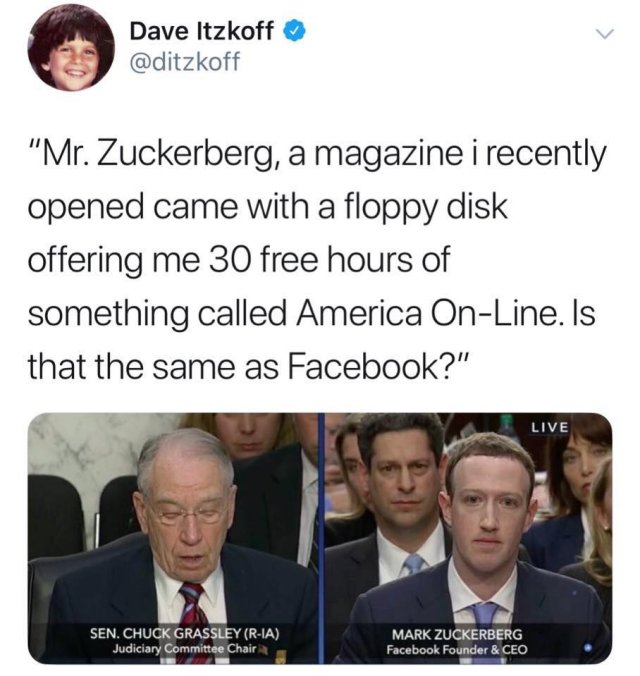
So far, the play here was for Mark Zuckerberg to buy a suit and tell everyone that he takes responsibility for the data leaks. Zuckerberg also said that he was open to regulation. When lawmakers pointed out anything Facebook did wrong, Zuckerberg replied how they were making it right. Questions he couldn't answer he promised to get back to them later.
In conclusion
People we talked to seem pleased that Zuckerberg took responsibility for the data collection without knowing what exactly that means. That's the nature of social media and sharing. Don't forget to see how to Manage or Block All Your Apps, Websites and Games That Facebook Can Access or watch this video:
Similar:
How to Secure Your Facebook Account
How to Stop Facebook’s Targeted Advertising
The Truth About Facebook Ads
Sorry, This Content Isn't Available Right Now Facebook Error
How to Delete or Remove Third-Party Facebook Applications and Websites
How to Delete Facebook Posts in Bulk With Chrome or Firefox (Video)
Manage or Block All Your Apps, Websites and Games That Facebook Can Access (Video)
How to Download All Your Facebook Data
comments powered by Disqus
To find out, just go to https://www.facebook.com/help/1873665312923476?helpref=search&sr=1&query=cambridge
This link is just a shortcut to typing in Cambridge in the search while at the Facebook Help Center.
You will automatically be notified if you were affected.
This is also a good time to Manage or Block All Your Apps, Websites and Games That Facebook Can Access.
Here's a screenshot of our results showing we're clean:
If you were affected, you'd be notified if you or a friend logged into the "This Is your Digital Life" app. Then you're informed that your public profile, page likes, date of birth, and current city were shared. Other possible information that could be exposed is mentioned including news feed, messages, timeline, posts, messages.
In other words, everything.
How did this happen?
In 2010, Facebook launched Open Graph for third-party apps. OpenGraph allowed external developers to reach out to Facebook users and request permission to access their personal data, and the kicker, to access their Facebook friends personal data.
As you can imagine, this then becomes a modern version of an online virus as these third-party apps now have access not only your personal information but your friends, and their friends, and so on.
Who is Cambridge Analytica?
In 2013, Cambridge academic Aleksandr Kogan and his company Global Science Research created an app called "This Is Your Digital Life" in 2013 or 2014. The app, similar to others you've seen, prompted users to answer questions for a psychological profile. Global Science Research paid 270,000 people to take the quiz to get the ball rolling.
Facebook, at the time, allowed this data collection, but a month before the New York Times story was released (exposing how data was collected) banned Cambridge Analytica.
How many were affected?
Once again, we have to guess. Facebook estimates the maximum reach to be 87 million users, but Cambridge Analytica claims they have data on 30 million users. The 30 million number is more likely because Facebook got to 87 million by counting the initial 270,000 users and all their friends, and their friends until that ended. This number assumes that each person gave their permission to the "This Is your Digital Life" app.
So, now what?
What happens from here is hard to say. Mark Zuckerberg testified before Congress and from what we saw, Congress has no clue about Facebook or the internet as a business. Frankly, it was embarrassing as they repeatedly asked questions that made no sense.
So far, the play here was for Mark Zuckerberg to buy a suit and tell everyone that he takes responsibility for the data leaks. Zuckerberg also said that he was open to regulation. When lawmakers pointed out anything Facebook did wrong, Zuckerberg replied how they were making it right. Questions he couldn't answer he promised to get back to them later.
In conclusion
People we talked to seem pleased that Zuckerberg took responsibility for the data collection without knowing what exactly that means. That's the nature of social media and sharing. Don't forget to see how to Manage or Block All Your Apps, Websites and Games That Facebook Can Access or watch this video:
Similar:
How to Secure Your Facebook Account
How to Stop Facebook’s Targeted Advertising
The Truth About Facebook Ads
Sorry, This Content Isn't Available Right Now Facebook Error
How to Delete or Remove Third-Party Facebook Applications and Websites
How to Delete Facebook Posts in Bulk With Chrome or Firefox (Video)
Manage or Block All Your Apps, Websites and Games That Facebook Can Access (Video)
How to Download All Your Facebook Data
comments powered by Disqus
