


How to Restore Default Shell Folders (Music, Videos, Pictures, Documents)
By Timothy Tibbettson 06/19/2023 |
Windows and most applications expect "shell folders" to be in a particular location. This includes folders you're most likely very familiar with, including Documents, Pictures, and Videos. However, if they are moved, your applications can not work correctly. Should you accidentally move one of these folders, most times, you can restore them by going to the folder properties.
We recently discovered this problem with OneDrive. When installed to C:\Users\MajorGeeks\Documents, it then became C:\Users\MajorGeeks\OneDrive\Documents, and we found that confusing. Under OneDrive in the systray, you can set it up not to sync and only with the PC, but it doesn't stop the issue unless you reset the folder.
WinTricks has a nice list of all the possible registry keys to reset these yourself manually. That said, those not willing to play with the registry can reset their folders with these registry scripts. The download contains three registry (.reg) files that can restore the default shell folders to their proper locations. The last script should only be used if the first two didn't fix the problem and are explained further below.
We do suggest that you back up the registry before you proceed. Here's how How to Back up or Restore the Windows Registry.
1: Computer\HKEY_CURRENT_USER\Software\Microsoft\Windows\CurrentVersion\Explorer\User Shell Folders:
w10_usf_defaults_hkcu.reg – Windows 10 Shell Folder Reset defaults for HKCU (HKEY_CURRENT_USER)
2: Computer\HKEY_LOCAL_MACHINE\SOFTWARE\Microsoft\Windows\CurrentVersion\Explorer\User Shell Folders:
w10_usf_defaults_hklm.reg – Windows 10 Shell Folder Reset defaults for HKLM (HKLM is HKEY_LOCAL_MACHINE)
3: Windows 10 Clear Override Values for HKCU (HKEY_CURRENT_USER)
w10_usf_clear_override_hkcu.reg - Windows 10 Clear Override Values is designed to reset Saved Pictures, Camera Roll, Screenshots, Local Documents, Local Downloads, Local Music, Local Pictures, and Local Videos if the folders were moved. They don't exist on a clean Windows 10 installation and only appear if the folders were moved.
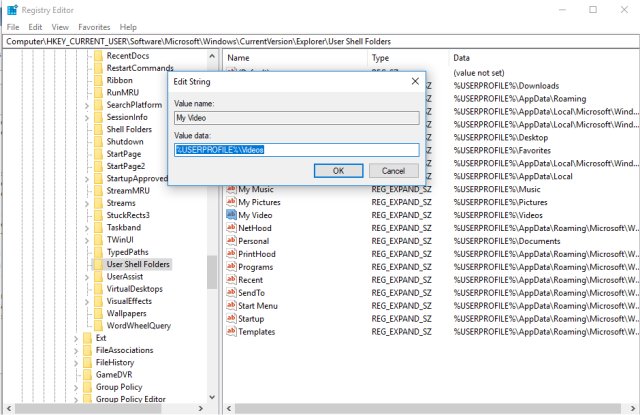
Geeks can manually navigate to Computer\HKEY_CURRENT_USER\Software\Microsoft\Windows\CurrentVersion\Explorer\User Shell Folders and Computer\HKEY_LOCAL_MACHINE\SOFTWARE\Microsoft\Windows\CurrentVersion\Explorer\User Shell Folders, right-click on the folder that's moved and select Modify. Here, you can enter the correct path if it was moved. That said, if you're not familiar with the registry, backup first, or better yet, use the reset scripts. In the screenshot below, we are using the My Video folder as an example. As you can see, most of these default folders should be %USERPROFILE%Videos, so if yours isn't, you can change it back.
While we're discussing it, backup before you proceed. Tweaking.Com Windows Repair has an easy to use Registry Backup, and we've also sent this fix in as a suggestion for future repairs in the program. Otherwise, you can download Restore Default Shell Folders here.
 1.jpg)
Restore Some Windows Settings
Because many Windows problems come with many possible solutions, we've had great luck using Tweaking.Com Windows Repair. It's safe, free, and has a consistent 5-star rating. It does not replace or remove anything but instead checks all expected Windows settings to see if anything has changed and reverts those settings to what they are supposed to be. You can run different scans to save time, so choose the one you think might fix your problem. Odds are, Windows Repair will find and fix your problem.
Similar:
How to Restore The Downloads Folder View in Windows 10
How to Move Your Desktop, 3D Objects, Downloads, Pictures, Music, and Video Folder Locations in Windows 10
How to Restore Previous Versions of Files, Folders, and Drives in Windows 10
How to Reset Folder View Settings in Windows 10
comments powered by Disqus
We recently discovered this problem with OneDrive. When installed to C:\Users\MajorGeeks\Documents, it then became C:\Users\MajorGeeks\OneDrive\Documents, and we found that confusing. Under OneDrive in the systray, you can set it up not to sync and only with the PC, but it doesn't stop the issue unless you reset the folder.
WinTricks has a nice list of all the possible registry keys to reset these yourself manually. That said, those not willing to play with the registry can reset their folders with these registry scripts. The download contains three registry (.reg) files that can restore the default shell folders to their proper locations. The last script should only be used if the first two didn't fix the problem and are explained further below.
We do suggest that you back up the registry before you proceed. Here's how How to Back up or Restore the Windows Registry.
1: Computer\HKEY_CURRENT_USER\Software\Microsoft\Windows\CurrentVersion\Explorer\User Shell Folders:
w10_usf_defaults_hkcu.reg – Windows 10 Shell Folder Reset defaults for HKCU (HKEY_CURRENT_USER)
2: Computer\HKEY_LOCAL_MACHINE\SOFTWARE\Microsoft\Windows\CurrentVersion\Explorer\User Shell Folders:
w10_usf_defaults_hklm.reg – Windows 10 Shell Folder Reset defaults for HKLM (HKLM is HKEY_LOCAL_MACHINE)
3: Windows 10 Clear Override Values for HKCU (HKEY_CURRENT_USER)
w10_usf_clear_override_hkcu.reg - Windows 10 Clear Override Values is designed to reset Saved Pictures, Camera Roll, Screenshots, Local Documents, Local Downloads, Local Music, Local Pictures, and Local Videos if the folders were moved. They don't exist on a clean Windows 10 installation and only appear if the folders were moved.
Geeks can manually navigate to Computer\HKEY_CURRENT_USER\Software\Microsoft\Windows\CurrentVersion\Explorer\User Shell Folders and Computer\HKEY_LOCAL_MACHINE\SOFTWARE\Microsoft\Windows\CurrentVersion\Explorer\User Shell Folders, right-click on the folder that's moved and select Modify. Here, you can enter the correct path if it was moved. That said, if you're not familiar with the registry, backup first, or better yet, use the reset scripts. In the screenshot below, we are using the My Video folder as an example. As you can see, most of these default folders should be %USERPROFILE%Videos, so if yours isn't, you can change it back.
While we're discussing it, backup before you proceed. Tweaking.Com Windows Repair has an easy to use Registry Backup, and we've also sent this fix in as a suggestion for future repairs in the program. Otherwise, you can download Restore Default Shell Folders here.
Restore Some Windows Settings
Because many Windows problems come with many possible solutions, we've had great luck using Tweaking.Com Windows Repair. It's safe, free, and has a consistent 5-star rating. It does not replace or remove anything but instead checks all expected Windows settings to see if anything has changed and reverts those settings to what they are supposed to be. You can run different scans to save time, so choose the one you think might fix your problem. Odds are, Windows Repair will find and fix your problem.
Similar:
comments powered by Disqus
