Providing Free and Editor Tested Software Downloads
< HOME | TUTORIALS | GEEK-CADE| WEB TOOLS | YOUTUBE | NEWSLETTER | DEALS! | FORUMS | >

MajorGeeks.com - Gettin' Geeky with it.

Software Categories

All In One Tweaks
Android
Antivirus & Malware
Appearance
Back Up
Browsers
CD\DVD\Blu-Ray
Covert Ops
Drivers
Drives (SSD, HDD, USB)
Games
Graphics & Photos
Internet Tools
Linux Distros
MajorGeeks Windows Tweaks
Multimedia
Networking
Office & Productivity
System Tools

Other news

· How To and Tutorials
· Life Hacks and Reviews
· Way Off Base
· MajorGeeks Deals
· News
· Off Base
· Reviews


IObit Black Friday Sale

spread the word

· YouTube
· Facebook
· Instagram
· Twitter
· Pintrest
· RSS/XML Feeds
· News Blur
· Yahoo
· Symbaloo

about

· Top Freeware Picks
· Malware Removal
· Geektionary
· Useful Links
· About Us
· Copyright
· Privacy
· Terms of Service
· How to Uninstall

top downloads

1. GS Auto Clicker
2. Macrium Reflect FREE Edition
3. Smart Defrag
4. MusicBee
5. Microsoft Visual C++ 2015-2022 Redistributable Package
6. Sergei Strelec's WinPE
7. Mozilla Firefox
8. Visual C++ Redistributable Runtimes AIO Repack
9. Winslop
10. Revo Uninstaller
More >>

top reads

Star How To Remove the Windows 11 Updated Start Menu

Star How To Disable Drag Tray

Star How To Permanently Delete Files Without Sending Them to the Recycle Bin in Windows 11

Star How To Repair Install Windows 11, and Keep All Your Files and Apps

Star How To Turn Off Folder Backup Syncing on OneDrive

Star AI Actions - What Are They and How To Enable/Disable Them

Star Microsoft Is Ending 3rd Party Printer Driver Support in 2026: How to Protect Old Printer Drivers

Star How To Stop Edge and Chrome Default Browser Prompts

Star How To Configure Allowed Apps for Controlled Folder Access

Star Pause or Disable Automatic App Updates in Microsoft Store


MajorGeeks.Com » Overview» Tutorials and Video Guides » Make Scrollbars Always Visible on Windows 10 & 11

Make Scrollbars Always Visible on Windows 10 & 11

By Timothy Tibbetts

on 06/15/2023

Show your PC some ❤️ Up to 90% off IObit’s top tools + 2 free months for Valentine’s Day
Because your PC doesn't care about Flowers and Candy!

As part of the Microsoft Fluent Design System, scrollbars can now be shown all the time. By default, your scrollbars are always hidden. Here's how to make scrollbars always visible.

Click on Start, then Settings (the gear icon) and click on Ease of Access. You should now be in the Display category. Scroll down where you see Simplify and personalize Windows and click on or off where it says Automatically hide scrollbars in Windows.
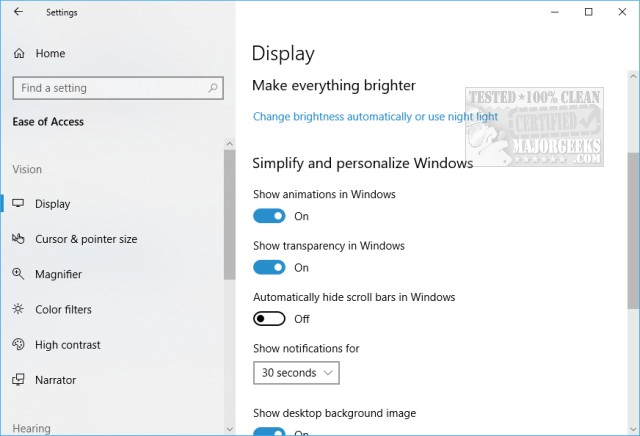


That's it! Feel free to poke around here and check out all the other features that Microsoft Fluent Design System has to offer.

Similar:
  • How to Add Color to Your Start, Taskbar, Action Center, and Title Bars
  • How to Customize the Windows 10 Taskbar
  • How to Add or Remove Quick Launch Toolbar in Windows
  • Enable or Disable Taskbar Transparency in Windows 10

    comments powered by Disqus


  • © 2000-2026 MajorGeeks.com
    Powered by Contentteller® Business Edition
