


What is Device Census or devicecensus.exe in Windows 10?
By Timothy Tibbettson 06/15/2023 |
An executable has appeared in Windows 10 called Device Census, or devicecensus.exe. What is this file, and is it safe?
People discovered Device Census because their computers were using 30-40% of their CPU, and throwing random errors, including "Device Census is using your webcam – Access has been blocked."
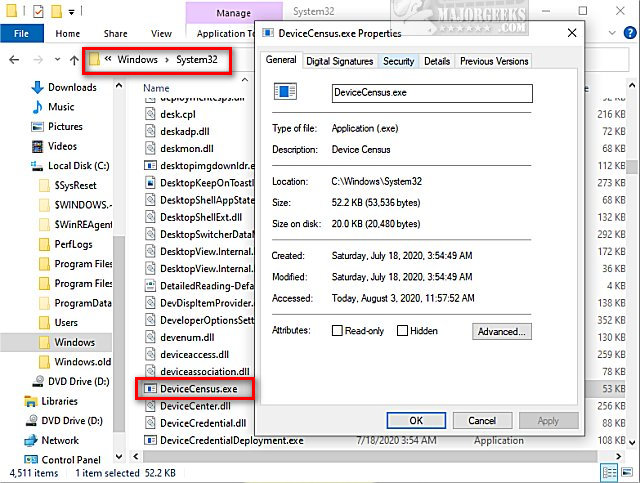
Device Census or devicecensus.exe can be found in C:\Windows\System32, and it is a valid application from Microsoft that helps Microsoft determine what build of Windows 10 you can upgrade to without problems. We believe Device Census appeared during the Windows 10 2004 May Update that was delayed for months due to hardware incompatibility.
Video tutorial:
Details collected include:
Windows 10 build, and architecture
Region
Language
Insider ring, if any
Hardware
You should not delete devicecensus.exe, but you can disable it or Pause or Delay Windows 10 Major (Feature) Updates.
Press the Windows Key + S, type in, and click on Task Scheduler.
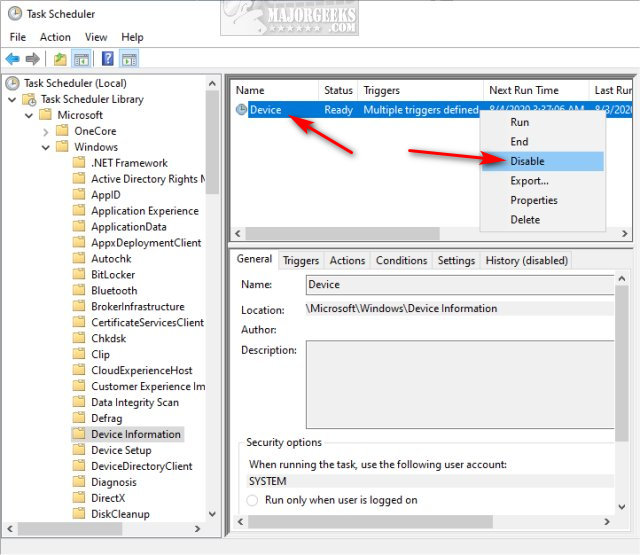
Expand Task Scheduler Library > Microsoft > Windows > Device Information.
Click on Device (Multiple triggers defined). You can find Disable on the far right, or right-click and click Disable.
Similar:
How to Pause or Delay Windows 10 Major (Feature) Updates
What Is the Update Orchestrator Service (UsoSvc)?
How to Delete the Windows.old Folder from Windows 10
How to Clean Up the WinSxS folder (Component Store) in Windows 10
What Is the $Windows.~Bt Folder and Can I Delete It?
comments powered by Disqus
People discovered Device Census because their computers were using 30-40% of their CPU, and throwing random errors, including "Device Census is using your webcam – Access has been blocked."
Device Census or devicecensus.exe can be found in C:\Windows\System32, and it is a valid application from Microsoft that helps Microsoft determine what build of Windows 10 you can upgrade to without problems. We believe Device Census appeared during the Windows 10 2004 May Update that was delayed for months due to hardware incompatibility.
Details collected include:
You should not delete devicecensus.exe, but you can disable it or Pause or Delay Windows 10 Major (Feature) Updates.
Press the Windows Key + S, type in, and click on Task Scheduler.
Expand Task Scheduler Library > Microsoft > Windows > Device Information.
Click on Device (Multiple triggers defined). You can find Disable on the far right, or right-click and click Disable.
Similar:
comments powered by Disqus
