


How to Fix Windows Update Error 0x80240016
By Timothy Tibbettson 06/26/2023 |
Error code 0x80240016 can appear when updating Windows 10. You are probably seeing "There were some problems installing updates, but we'll try again later."
1: Windows Update Error 0x80240016 - Run The Troubleshooter
Always try a troubleshooter when available first. Press Start > Settings > Update & security. Click on Troubleshoot on the left.
Click on Additional troubleshooters.
Scroll down and click on Windows Update, then Run the troubleshooter.
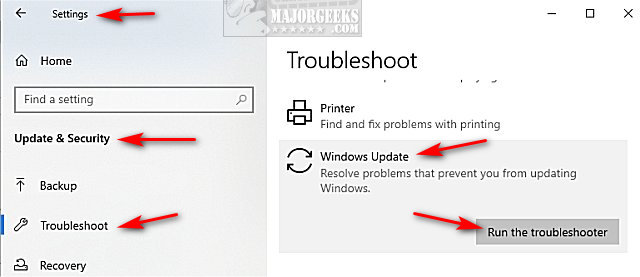
Follow the prompts and automatically repair any problems.
2: Windows Update Error 0x80240016 - Reboot
Often, a simple reboot will solve the problem. Windows sometimes requires a reboot to complete Windows Updates.
3: Windows Update Error 0x80240016 - Windows Repair
Download Windows Repair from MajorGeeks.
Boot into Safe Mode.
Select Preset: Windows Updates.
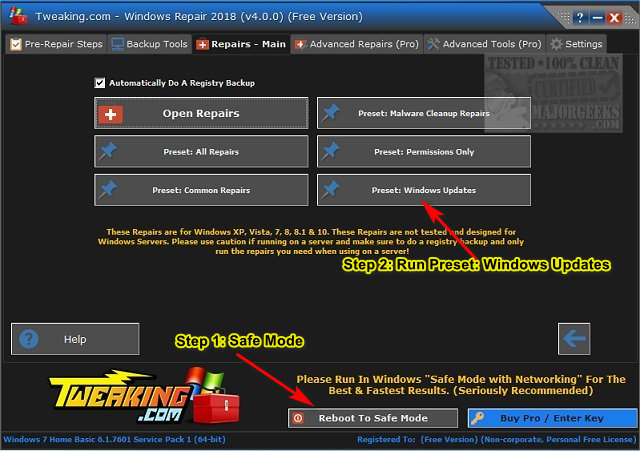
Reboot when completed.
4: Windows Update Error 0x80240016 - Clear SoftwareDistribution Folder
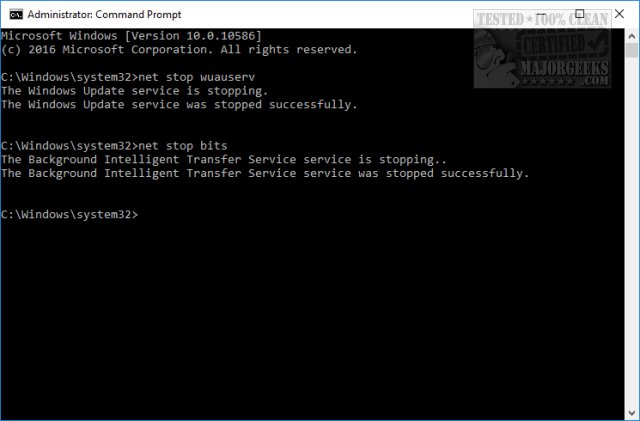
Open a elevated command prompt and type in the following two lines, and press Enter after each:
net stop wuauserv
net stop bits
Each command should take a few seconds, so wait until you see the messages that the services were stopped successfully. Leave the command prompt open for now.
Navigate to C:WindowsSoftwareDistribution and open the folder. Press CTRL + A to select all files and folder, then press the Delete key. All the files in the SoftwareDistribution should be deleted. We don't want to delete the folder itself.
Rebooting will start the two services we stopped, but if you don't want to reboot, open up the command prompt again and type in the following two lines, and press Enter after each:
net start wuauserv
net start bits
5: Windows Update Error 0x80240016 - Run Virus Scan
Open your antivirus and run a complete scan.
If nothing is found, we recommend a full system scan with Malwarebytes free or Malwarebytes Premium.
Similar:
How to Delete the Windows.old Folder from Windows 10
What Is the $Windows.~Bt Folder and Can I Delete It?
Configure When and How Windows Updates Are Delivered
How to View Windows Update History in Windows 10
How-To Delete Pending Windows Updates
How to Uninstall Windows 10 Updates
comments powered by Disqus
1: Windows Update Error 0x80240016 - Run The Troubleshooter
Always try a troubleshooter when available first. Press Start > Settings > Update & security. Click on Troubleshoot on the left.
Click on Additional troubleshooters.
Scroll down and click on Windows Update, then Run the troubleshooter.
Follow the prompts and automatically repair any problems.
2: Windows Update Error 0x80240016 - Reboot
Often, a simple reboot will solve the problem. Windows sometimes requires a reboot to complete Windows Updates.
3: Windows Update Error 0x80240016 - Windows Repair
Download Windows Repair from MajorGeeks.
Boot into Safe Mode.
Select Preset: Windows Updates.
Reboot when completed.
4: Windows Update Error 0x80240016 - Clear SoftwareDistribution Folder
Open a elevated command prompt and type in the following two lines, and press Enter after each:
net stop wuauserv
net stop bits
Each command should take a few seconds, so wait until you see the messages that the services were stopped successfully. Leave the command prompt open for now.
Navigate to C:WindowsSoftwareDistribution and open the folder. Press CTRL + A to select all files and folder, then press the Delete key. All the files in the SoftwareDistribution should be deleted. We don't want to delete the folder itself.
Rebooting will start the two services we stopped, but if you don't want to reboot, open up the command prompt again and type in the following two lines, and press Enter after each:
net start wuauserv
net start bits
5: Windows Update Error 0x80240016 - Run Virus Scan
Open your antivirus and run a complete scan.
If nothing is found, we recommend a full system scan with Malwarebytes free or Malwarebytes Premium.
Similar:
How to Delete the Windows.old Folder from Windows 10
What Is the $Windows.~Bt Folder and Can I Delete It?
Configure When and How Windows Updates Are Delivered
How to View Windows Update History in Windows 10
How-To Delete Pending Windows Updates
How to Uninstall Windows 10 Updates
comments powered by Disqus
