


ExplorerPatcher 26100.8457.70.4 Pre-Release / 26100.8457.70.3
|
Author:
Valentin-Gabriel Radu
Date: 07/06/26 Size: 12 MB License: Open Source Requires: 11|10 Downloads: 153567 times  TIP:
Click Here to Repair or
TIP:
Click Here to Repair orRestore Missing Windows Files |
Download (EXE) Download (ARM64) Download (EXE Pre-Release) Download (ARM64 Pre-Release) Download@MajorGeeks Download@MajorGeeks
|
MajorGeeks: Setting the standard for editor-tested, trusted, and secure downloads since 2002. |
 Avast Free Antivirus Worried about finance scams?
Get free antivirus with AI-powered online scam detection Download Free!
ExplorerPatcher: Your One-Stop Solution to Tame the Windows Interface
Let’s face it, Windows 11 has introduced some controversial UI changes that aren’t sitting well with some Windows faithful. If you’re one of the legions of users longing for the simpler, more familiar feel of Windows 10 (or earlier), ExplorerPatcher might just be the magic wand you’ve been looking for. Think of it as your customization toolkit that bends Windows to your will. Oh, and did we mention it’s free?
What Does ExplorerPatcher Do?
ExplorerPatcher doesn't try to reinvent the wheel; it just makes the one you already have spin better. Once installed, this lightweight utility gives you the power to tweak and restore dozens of interface elements that Microsoft quietly swept away. Whether it’s returning to the universally adored Windows 10 Start Menu, repositioning your Taskbar, or turning off annoying bloat like "Recommended" tiles, ExplorerPatcher makes it happen—and you’re in control every step of the way.
Here are the highlights:
● Start Menu Freedom: Love the tiled layout of Windows 10? Prefer something compact? You can switch between Windows 10 and 11 styles, disable "Recommended" clutter, and even make the Start Menu open directly to the full apps list. It’s your Start Menu, your rules.
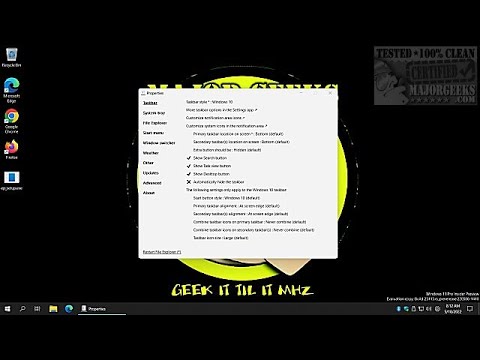
● Taskbar Tweaks Galore: Adjustable size? Check. Resizable Taskbar with Windows 10 functionality? Check. ExplorerPatcher might be the cure for your Taskbar woes, offering flexibility that Windows 11 didn’t think you needed.
● System Tray Revival: Prefer Windows 10 tray icons over Windows 11’s minimalistic approach? Reincarnate them, alongside other fine-tuned options for notifications, network settings, and more.
● File Explorer Upgrades: Unlock advanced configurations like disabling modern search, removing the new right-click context menu, and ditching features that get in your way more often than they help. Navigate your PC the way you *want*.
● Windows Switcher Customization: From Alt + Tab behavior to multiple monitor optimizations, ExplorerPatcher offers options galore for power users looking to make multitasking less of a hassle.
● Weather Widget Wizardry: Miss having a compact, useful weather widget on your Taskbar? Change its appearance, size, refresh rate, and even color to better suit your workflow and aesthetic.
● Advanced Tweaks: For the brave (or the especially picky), there’s a robust “Advanced” section teeming with experimental features. A word of caution: read the documentation before you dive in.
▶
Why ExplorerPatcher Stands Out
ExplorerPatcher isn’t a bloated app trying to upsell you on premium features. It’s lightweight, resource-efficient, and hassle-free. All you need to do is drop the standalone downloadable file into the right location and launch it—no complicated install process, no bloatware tagging along for the ride.
Even the interface is designed with usability in mind. A simple right-click on the Taskbar opens up the configuration menu, where its options are organized into intuitive categories. If you know what you want, you’ll probably find it without much digging. If you don’t, it’s worth exploring—the tool offers some unexpected quality-of-life enhancements.
How Does ExplorerPatcher Help You Day to Day?
● Efficiency: Spend less time hunting for hidden functions or adapting to a UI that doesn’t resonate with you. Screen interactions flow the way you’ve always enjoyed, saving time and frustration.
● Consistency: Whether you're a Windows power user or simply resistant to unnecessary change, ExplorerPatcher restores a familiar computing environment that feels like home.
● Control: Unlike Windows itself, which often limits choice, ExplorerPatcher hands you the keys to the kingdom. Modify what *you* want, when *you* want.
● Lightweight: This isn’t some sluggish third-party interface designed to hog resources. ExplorerPatcher runs smoothly without impacting system performance.
Perfect for Long-Time Windows Users
If you’ve been a loyal Windows user for years and found the jump to Windows 11 a bit jarring, ExplorerPatcher helps keep the learning curve shallow. And while this isn’t exactly software designed for beginners, the fact that its features remain so accessible—and are explained in developer-provided documentation—makes it manageable for anyone who enjoys hands-on tinkering.
Geek Verdict: Worth Every Byte
ExplorerPatcher wins points for simplicity, practicality, and efficiency. It’s a tiny but mighty tool that fixes some of the most grating shortcomings of Windows 11—and it doesn’t cost a cent. Whether you’re looking to reclaim an ounce of productivity or just “get Windows out of your way,” ExplorerPatcher is well worth a download.
Here's our take: if you’re eager to customize Windows 11 or restore some of the best features from Windows 10, ExplorerPatcher delivers where other solutions fall short. Reliable, versatile, and Open Source —- this is a must-have for the modern PC tinkerer.
Similar:
● How to Enable or Disable Windows 10 & 11 Full Screen Start Menu
● How to Customize the Windows 10 & 11 Start Menu
● How to Collapse or Hide Apps List in Windows 10 Start Menu
● How to Enable or Disable Most Used Apps on Windows 10 & 11 Start Menu
● How to Disable Bing Search in the Windows 10 & 11 Start Menu
● How to Make the Windows 10 Start Menu Look Like Windows 7
Version History for ExplorerPatcher:
https://github.com/valinet/ExplorerPatcher/releases
Editor's Note:
ExplorerPatcher does get multiple hits on VirusTotal, and you may get a warning from your antivirus that the file isn't commonly downloaded.
 Screenshot for ExplorerPatcher
Top Downloads In Shell Enhancements
 OldNewExplorer 1.1.9 [ 2019-09-24 05:39:21 | 272 KB | Freeware | 10|8|7 | 5 ] ExplorerPatcher 26100.8457.70.4 Pre-Release / 26100.8457.70.3 [ 2026-07-06 09:17:37 | 12 MB | Open Source | 11|10 | 5 ] SideSlide 6.50 [ 2026-08-31 22:39:36 | 1 MB | Freeware | 11|10|8|7 | 5 ] Send To Toys 2.73 [ 2023-08-19 03:30:27 | 3.38 MB | Freeware | 11 | 5 ] MiniBin 6.6.0.0 [ 2014-03-25 19:00:01 | 85.1 KB | Freeware | Win 8 / Win 7 / Vista/ XP | 5 ]
 Tactical Briefings
Comment Rules & Etiquette - We welcome all comments from our readers, but any comment section requires some moderation. Some posts are auto-moderated to reduce spam, including links and swear words. When you make a post, and it does not appear, it went into moderation. We are emailed when posts are marked as spam and respond ASAP. Some posts might be deleted to reduce clutter. Examples include religion, politics, and comments about listing errors (after we fix the problem and upvote your comment). Finally, be nice. Thank you for choosing MajorGeeks.

© 2000-2026 MajorGeeks.com
Powered by Contentteller® CMS System