


IPNetwork Monitor 1.1 Build 354
|
Author:
IPNetwork Monitor LLC
Date: 07/01/26 Size: 118 MB License: Freemium Requires: 11|10|8|7|Linux|macOS Downloads: 615 times  TIP:
Click Here to Repair or
TIP:
Click Here to Repair orRestore Missing Windows Files |
Download (EXE) Download (EXE Agent) Download (Linux Agent) Download (Mac Agent)
|
MajorGeeks: Setting the standard for editor-tested, trusted, and secure downloads since 2002. |
 Avast Free Antivirus Worried about finance scams?
Get free antivirus with AI-powered online scam detection Download Free!
What is IPNetwork Monitor?
IPNetwork Monitor is a comprehensive, distributed network and server monitoring solution designed to ensure optimal performance and availability across a wide range of resources, including servers, websites, and applications.
In-Depth Monitoring
IPNetwork Monitor provides in-depth monitoring of network bandwidth and equipment using protocols such as SNMP (for UNIX, Linux, and macOS environments) and WMI (for Windows systems).
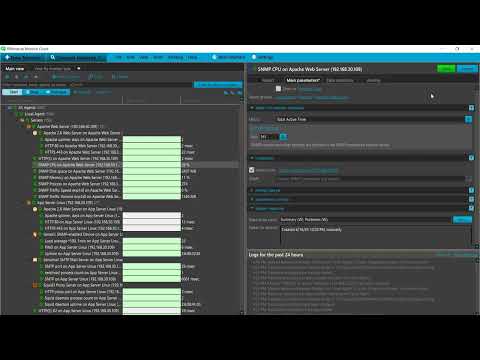
To streamline discovery and monitoring, IPNetwork Monitor includes built-in application templates covering a wide range of servers and services. The inclusion of Remote Network Agents facilitates monitoring across multiple isolated networks, ensuring that systems, regardless of location, can be effectively managed. You can also view data through the included Web Interface if desired.
Multiple Protocols & Plugins Supported
IPNetwork supports an extensive array of communication protocols, including HTTP, HTTPS, FTP, SMTP, POP3, IMAP, ODBC, and PING, allowing for flexible monitoring of virtually any aspect of a networked environment. Further enhancing its functionality, IPNetwork Monitor features an integrated SNMP Management Information Base (MIB) browser complete with SNMP SET capabilities, enabling advanced management tasks. Additionally, SNMP traps can be monitored to provide instant event-driven alerts, allowing network administrators to respond swiftly to potential issues.
You can enhance your monitoring capabilities by integrating any of the thousands of supported Nagios plugins (version 2.0.3). The alerting system is robust, capable of notifying users via multiple channels, including email, SMS, Jabber, ICQ, AOL, and SNMP SET commands. Furthermore, the software can trigger sound notifications or execute custom scripts and applications in response to specific events.
▶
Admin Tools Provide Auto-Reporting
IPNetwork Monitor also comes with a suite of administrative tools that facilitate the generation of automatic reports on a daily, weekly, or monthly basis. These reports can provide summaries, track trends, and deliver insights focused on specific issues pertinent to any resources, hosts, or groups. Users can also customize reports for specific time periods and access them directly via an intuitive web interface, enabling easy review and analysis of network performance data.
Real-Time Internal/External Resource Tracking
One of the standout features of IPNetwork Monitor is its ability to track both internal and external resources in real time. This includes monitoring internet-facing websites, intranet applications, mail servers, and databases such as Oracle, MySQL, Microsoft SQL Server, and ODBC. Network devices and bandwidth utilization are also closely monitored, providing network administrators with vital data to maintain system integrity.
Geek Verdict
IPNetwork Monitor offers a powerful, distributed solution for monitoring your network and servers, ensuring peak performance and availability for your entire infrastructure. From servers to websites and applications, IPNetwork Monitor covers it all. Best of all, it is completely self-hosted, giving you full control and security over your monitoring processes.
● How to Check Your Network Adapter Connection Speed in Windows 10 & 11
● How to Share Files Wirelessly in Windows 10 & 11
● How to Enable or Disable Offline Files in Windows 10
● How to Create a WLAN Report in Windows
● How to Use the Windows 10 & 11 Network Packet Sniffer
● How to Turn On or Off Network Discovery (Make this PC Discoverable)
Version History for IPNetwork Monitor:
https://ipnetwork-monitor.com/release-notes/snmp-postgresql-device-templates.html
Limitations:
You can try the full version, which supports up to 500 monitors, for free for 30 days. After the trial, it will automatically switch to a free version that supports 50 monitors with no time limit! You can view the pricing plans here (prices start at $199.00).
 Screenshot for IPNetwork Monitor
Top Downloads In Networking
 Simple Port Forwarding 3.8.5 [ 2014-01-29 19:01:51 | 6.63 MB | Freeware | Win 8 / Win 7 / Vista/ XP | 5 ] Network Inventory Advisor 5.0.155 [ 2018-10-29 06:49:00 | 15.1 MB | Shareware $89.00+ | Win 10 / 8 / 7 / Vista / XP | 4 ] Advanced IP Scanner 2.5.4594.1 [ 2022-06-22 07:46:34 | 21 MB | Freeware | 11|10|8|7 | 5 ] Wireshark 4.6.9 [ 2026-09-24 03:51:46 | 70-135 MB | Freeware | 11|10|8|7|macOS | 5 ] Look@LAN 2.50 Build 35 [ 2016-10-16 09:26:05 | 2.1 MB | Freeware | Win 10 / 8 / 7 / Vista / XP | 5 ]
 Tactical Briefings
Comment Rules & Etiquette - We welcome all comments from our readers, but any comment section requires some moderation. Some posts are auto-moderated to reduce spam, including links and swear words. When you make a post, and it does not appear, it went into moderation. We are emailed when posts are marked as spam and respond ASAP. Some posts might be deleted to reduce clutter. Examples include religion, politics, and comments about listing errors (after we fix the problem and upvote your comment). Finally, be nice. Thank you for choosing MajorGeeks.

© 2000-2026 MajorGeeks.com
Powered by Contentteller® CMS System