


Sandboxie 5.73.5
|
Author:
David Xanatos
Date: 09/25/26 Size: 3 MB License: Open Source Requires: 11|10|8|7 Downloads: 490141 times  TIP:
Click Here to Repair or
TIP:
Click Here to Repair orRestore Missing Windows Files |
Download (32-Bit) Download (64-Bit) Download (32-Bit Pre-Release) Download (64-Bit Pre-Release)
|
MajorGeeks: Setting the standard for editor-tested, trusted, and secure downloads since 2002. |
 Avast Free Antivirus Worried about finance scams?
Get free antivirus with AI-powered online scam detection Download Free!
Sandboxie (Classic) lets you run programs in an isolated space, which will prevent them from making permanent changes to other programs and data to your computer. Sandboxie-Plus also available.
When you browse the web, changes occur to your system. Most of the time, these changes are harmless, like recording the addresses of websites you have visited (and when), so the browser can help you complete a web address that you type in. However, whether these changes are harmless or harmful, they do, in fact, happen to your computer system.
It requires neither the disabling nor blocking of functions available to websites through the browser. Instead, it isolates and quarantines the outcome of whatever the Web site may do to your computer, including the installation of unsolicited software. Thus, there is no trade-off of functionality for security. In essence, the Web site can use the full range of active content tools, and if it uses these tools maliciously to install software or otherwise make changes to your computer, these changes can be easily undone.
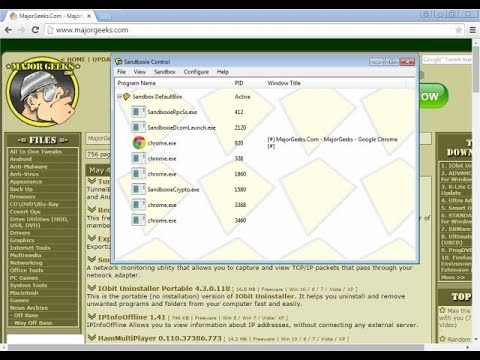
According to Sophos, the above statement is no longer fully applicable as they transition to Open Source. Sophos states, "After thoughtful consideration, we decided that the best way to keep Sandboxie going was to give it back to its users – transitioning it to an Open Source tool. We will release more information about the Open Source project as we continue to work on the details."
"Until the Open Source transition is completed, we have decided to make all restricted features of Sandboxie completely free."
Similar:
● How to Enable the Windows Defender Sandbox in Windows 10 & 11
● How to Disable Windows 10 & 11 Activity History Permanently
● How to Disable the Windows 10 & 11 Task Scheduler Privacy and Automatic Maintenance Related Tasks
● How to Set Your Default Location in Windows 10 & 11
When you browse the web, changes occur to your system. Most of the time, these changes are harmless, like recording the addresses of websites you have visited (and when), so the browser can help you complete a web address that you type in. However, whether these changes are harmless or harmful, they do, in fact, happen to your computer system.
It requires neither the disabling nor blocking of functions available to websites through the browser. Instead, it isolates and quarantines the outcome of whatever the Web site may do to your computer, including the installation of unsolicited software. Thus, there is no trade-off of functionality for security. In essence, the Web site can use the full range of active content tools, and if it uses these tools maliciously to install software or otherwise make changes to your computer, these changes can be easily undone.
▶
According to Sophos, the above statement is no longer fully applicable as they transition to Open Source. Sophos states, "After thoughtful consideration, we decided that the best way to keep Sandboxie going was to give it back to its users – transitioning it to an Open Source tool. We will release more information about the Open Source project as we continue to work on the details."
"Until the Open Source transition is completed, we have decided to make all restricted features of Sandboxie completely free."
Similar:
● How to Enable the Windows Defender Sandbox in Windows 10 & 11
● How to Disable Windows 10 & 11 Activity History Permanently
● How to Disable the Windows 10 & 11 Task Scheduler Privacy and Automatic Maintenance Related Tasks
● How to Set Your Default Location in Windows 10 & 11
Version History for Sandboxie:
https://github.com/sandboxie-plus/Sandboxie/releases
Editor's Note:
Support for Windows 7 and 32-bit operating systems is discontinued as of version 5.70.12.
 Screenshot for Sandboxie
Top Downloads In Virtual PC & Sandbox
 Sandboxie 5.73.5 [ 2026-09-25 11:01:41 | 3 MB | Open Source | 11|10|8|7 | 5 ] VMware Player 17.6.3 [ 2025-03-04 17:15:29 | 213 MB | Freeware | 10|8|Linux|macOS | 5 ] Phoenix OS (ISO) 3.6.1 [ 2019-09-01 05:55:51 | 850 MB | Freeware | 11 | 5 ] Toolwiz Time Freeze 4.3.1.5000 [ 2016-06-02 14:43:53 | 2.80 MB | Freeware | Win 10 / 8 / 7 / Vista / XP | 5 ] VirtualBox 7.2.20 [ 2026-09-22 12:35:20 | 100-170 MB | Freeware | 11|10|8|7|Linux|macOS | 5 ]
 Tactical Briefings
Comment Rules & Etiquette - We welcome all comments from our readers, but any comment section requires some moderation. Some posts are auto-moderated to reduce spam, including links and swear words. When you make a post, and it does not appear, it went into moderation. We are emailed when posts are marked as spam and respond ASAP. Some posts might be deleted to reduce clutter. Examples include religion, politics, and comments about listing errors (after we fix the problem and upvote your comment). Finally, be nice. Thank you for choosing MajorGeeks.

© 2000-2026 MajorGeeks.com
Powered by Contentteller® CMS System