


How to Turn off Facebook's Annoying Login With Profile Picture Feature
By Timothy Tibbettson 06/19/2023 |
If you use Facebook often, as we do here at MajorGeeks, then you may have noticed that after logging out you are greeted with your profile picture on the next session's login screen. This process has been activated for ease of access to your account and allows you to click the picture to log back into your profile - sans re-entering your password. Don't know about you but it is up there in the hateable features list.
This tutorial no longer applies. Facebook has removed this option.
If you leave your machine after logging out someone can easily jump into your account like a jokester family member, etc., and change things on you or worse post those pictures from that time you [enter embarrassing moment here].
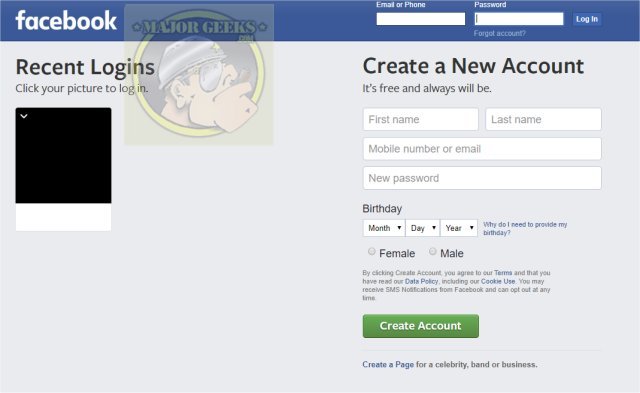
There is an uncomplicated way to turn it off, however, frustratingly it is a per session fix, and you will need to perform it every time before you log out. Sigh, annoying.
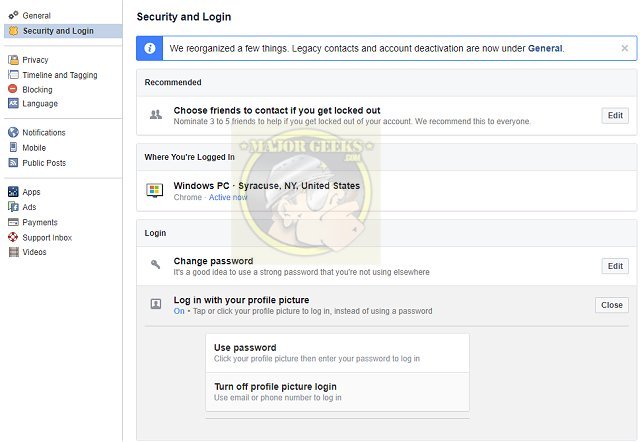
You will simply head over to Settings, then from the left-hand menu click Security and Login. From there you will scroll down to the Login section and click Login with Profile Picture and edit that preference to OFF. Hopefully, Facebook will make this a saveable choice so that you don't need to go through these steps each logout but probably not.
Similar:
How to Secure Your Facebook Account
How to Stop Facebook’s Targeted Advertising
The Truth About Facebook Ads
Sorry, This Content Isn't Available Right Now Facebook Error
How to Delete or Remove Third-Party Facebook Applications and Websites
How to Delete Facebook Posts in Bulk With Chrome or Firefox (Video)
How to Tell If Your Facebook Data Was Harvested by Cambridge Analytica
Manage or Block All Your Apps, Websites and Games That Facebook Can Access (Video)
How to Download All Your Facebook Data
comments powered by Disqus
This tutorial no longer applies. Facebook has removed this option.
If you leave your machine after logging out someone can easily jump into your account like a jokester family member, etc., and change things on you or worse post those pictures from that time you [enter embarrassing moment here].
There is an uncomplicated way to turn it off, however, frustratingly it is a per session fix, and you will need to perform it every time before you log out. Sigh, annoying.
You will simply head over to Settings, then from the left-hand menu click Security and Login. From there you will scroll down to the Login section and click Login with Profile Picture and edit that preference to OFF. Hopefully, Facebook will make this a saveable choice so that you don't need to go through these steps each logout but probably not.
Similar:
comments powered by Disqus
