


How to Remove or Customize News and Interests in Windows 10
By Timothy Tibbettson 06/15/2023 |
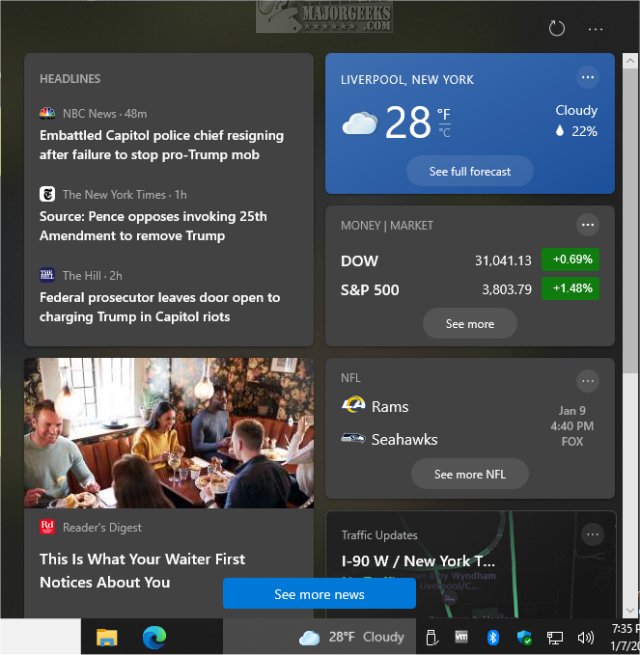
Starting with Windows 10 Build 21286, there is now a News and interests option that directly shows the weather and news from your Taskbar. Here's how to remove or customize it.
The new New and interests shows you the weather and other articles, including stocks, sports, and current events.
How to Add or Remove News and Interest in Windows 10 - Registry Files
You can download our registry files to make the changes.
There are three registry files included - News and Interests - Remove.reg, News and Interests Icon Only.reg, and News and Interests Icon AND Text.reg (Default). Double-click the one for what you want.
Click Yes when prompted by User Account Control.
Click Yes when prompted by Registry Editor.
Click OK when prompted by the Registry Editor.
This tweak is included as part of MajorGeeks Windows Tweaks.
How to Remove News and Interest in Windows 10
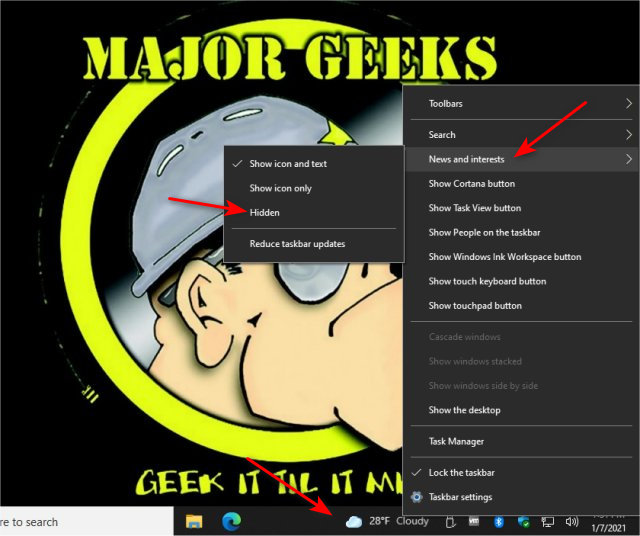
Right-click anywhere on your Taskbar and click on News and interests
Click on Hidden.
How to Customize News and Interest in Windows 10
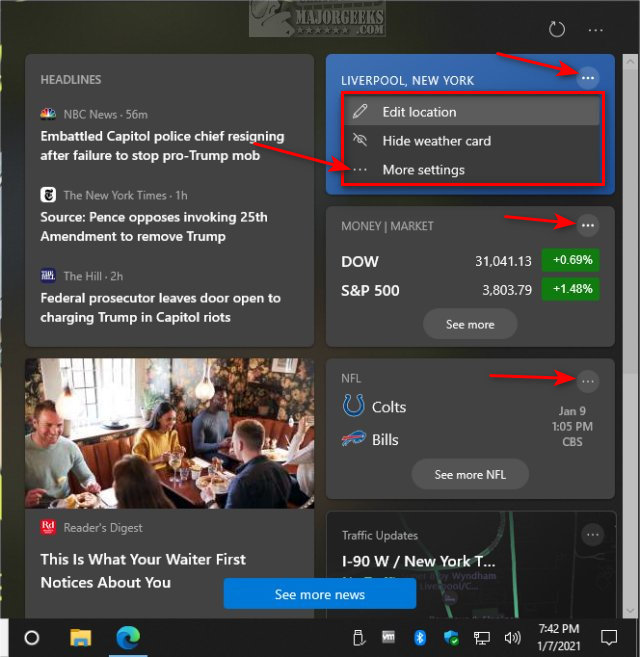
Open News and interest and look for the three dots in the top-right corner of any card. Instead of managing one card at a time, click on More settings.
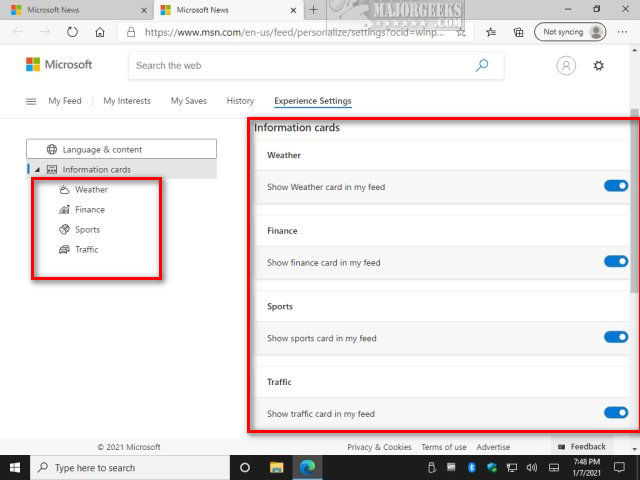
A page at MSN will open, allowing you to customize everything in one place. You can enable or disable cards if you want, then move on to categories.
At the time of this article, the News and interests feature is only in the Windows Insider Preview, so we expect more options to be added later.
Similar:
How to Customize the Windows 10 Taskbar
How to Add or Remove Quick Launch Toolbar in Windows
How to Show or Hide the Search Box or Search Icon in Windows 10
How to Add Color to Your Start, Taskbar, Action Center, and Title Bars
Enable or Disable Taskbar Transparency in Windows 10
comments powered by Disqus
The new New and interests shows you the weather and other articles, including stocks, sports, and current events.
How to Add or Remove News and Interest in Windows 10 - Registry Files
You can download our registry files to make the changes.
There are three registry files included - News and Interests - Remove.reg, News and Interests Icon Only.reg, and News and Interests Icon AND Text.reg (Default). Double-click the one for what you want.
Click Yes when prompted by User Account Control.
Click Yes when prompted by Registry Editor.
Click OK when prompted by the Registry Editor.
This tweak is included as part of MajorGeeks Windows Tweaks.
How to Remove News and Interest in Windows 10
Right-click anywhere on your Taskbar and click on News and interests
Click on Hidden.
How to Customize News and Interest in Windows 10
Open News and interest and look for the three dots in the top-right corner of any card. Instead of managing one card at a time, click on More settings.
A page at MSN will open, allowing you to customize everything in one place. You can enable or disable cards if you want, then move on to categories.
At the time of this article, the News and interests feature is only in the Windows Insider Preview, so we expect more options to be added later.
Similar:
comments powered by Disqus
