


How to See Less Alcohol, Parenting, Pets, and Political Ads on Facebook
By Timothy Tibbettson 06/26/2023 |
Facebook ads can be pretty annoying. While you can't turn them off, you can see fewer advertisements regarding Alcohol, Parenting, Pets, and Social Issues, Elections, or Politics.
Keep in mind that Facebook will not allow you to disable any genre of advertisements entirely.
Video tutorial:
Mobile - Settings > Settings & Privacy > Settings. Scroll down to Ads and click on Ad Preferences > Ad Topics.
Desktop - Settings > Ads. Scroll down to Ad Topics.
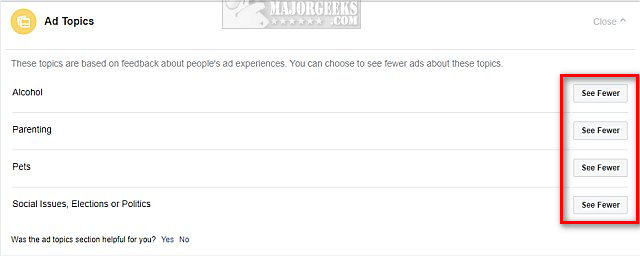
Click on See fewer for:
Alcohol
Parenting
Pets
Social Issues, Elections or Politics
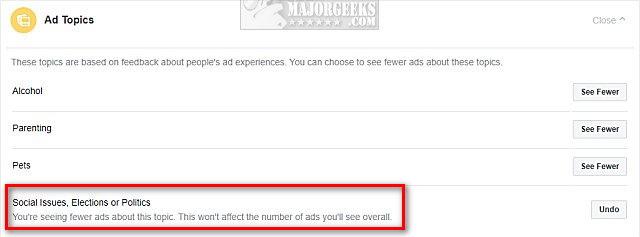
Once you make your choice, you should see an Undo button for later and a message that states, "You're seeing fewer ads about this topic. This won't affect the number of ads you'll see overall."
While not a total solution, it's all we have right now.
Similar:
How to Stop Facebook’s Targeted Advertising
How to View and Delete Your Off-Facebook Activity
How to Delete or Remove Third-Party Facebook Applications and Websites
How to Manage or Delete All the Apps, Websites and Games That Facebook Can Access
Why You Shouldn't Share Giveaways on Facebook
Why You Shouldn't Take Facebook Surveys or Quizzes
Does a New Facebook Algorithm Only Show You 25 or 26 Friends?
comments powered by Disqus
Keep in mind that Facebook will not allow you to disable any genre of advertisements entirely.
Mobile - Settings > Settings & Privacy > Settings. Scroll down to Ads and click on Ad Preferences > Ad Topics.
Desktop - Settings > Ads. Scroll down to Ad Topics.
Click on See fewer for:
Alcohol
Parenting
Pets
Social Issues, Elections or Politics
Once you make your choice, you should see an Undo button for later and a message that states, "You're seeing fewer ads about this topic. This won't affect the number of ads you'll see overall."
While not a total solution, it's all we have right now.
Similar:
How to Stop Facebook’s Targeted Advertising
How to View and Delete Your Off-Facebook Activity
How to Delete or Remove Third-Party Facebook Applications and Websites
How to Manage or Delete All the Apps, Websites and Games That Facebook Can Access
Why You Shouldn't Share Giveaways on Facebook
Why You Shouldn't Take Facebook Surveys or Quizzes
Does a New Facebook Algorithm Only Show You 25 or 26 Friends?
comments powered by Disqus
