


How to Create a Test Account on Facebook
By Timothy Tibbettson 06/19/2023 |
Facebook allows you to create a test account without the need for an email, but it's only just for testing purposes. According to Facebook "When you are unable to reproduce a security vulnerability with a test account, it is acceptable to use a real account, except for automated testing."
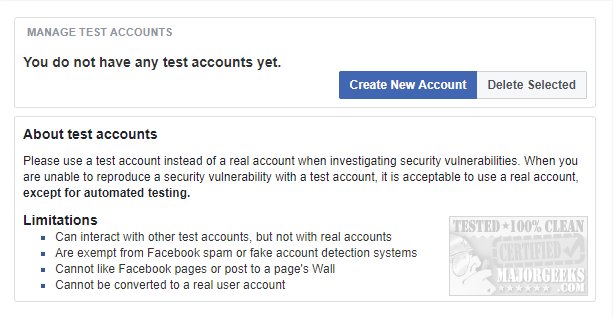
Limitations:
Can interact with other test accounts, but not with real accounts
Are exempt from Facebook spam or fake account detection systems
Cannot like Facebook pages or post to a page's Wall
Cannot be converted to a real user account
You can use a username, but you have to give them your phone number
To create a test account go to https://www.facebook.com/whitehat/accounts/ and select Create New account.
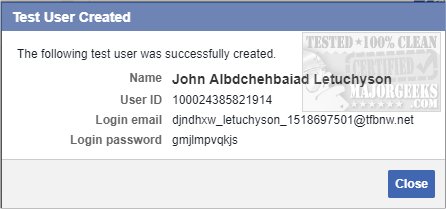
You will be given a Name, User ID, Login email, and Login password.
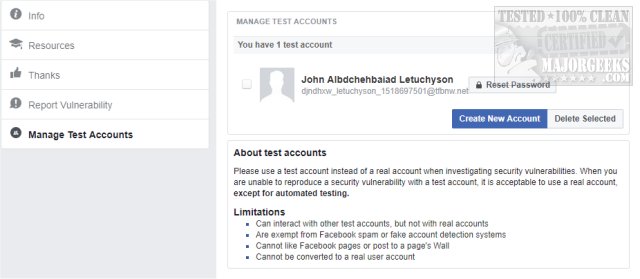
Once completed you can begin your research and even get paid if you discover a new vulnerability. You can also create another account or delete any created accounts. On the left, you will see Info, Resources, Thanks, Report Vulnerability, and Manage Test Accounts.
We understand there's a handful of people who don't want to use Facebook but let's be honest; it's hard to avoid so let's address the obvious elephant in the room.
-=- Advertisement -=-
I've suggested to many people who find an occasional need to use Facebook to use what is known as a throwaway or disposable email somewhere. Create a free email account you're never going to use and use that to create a Facebook account. Don't post, don't add friends, don't edit anything, after all, who cares? We like to use an obvious name like Jim Smith.
As for a phone number, you could try Google Voice to make up a phone number you can use.
There are so many free email services available; you can just search for free email and pick one. Some free email services include Google, AOL, Mail.com, Yahoo!, Outlook, Yandex, Proton, and dozens of others.
A throwaway email allows you to make use of Facebook logins in millions of places without really using Facebook. While we hear from the occasional person who swears they don't use Facebook, the reality is it's the most popular website in the world. The odds that someone never uses it is about the same as saying they never use Google. And who are all these people following Kim Kardashian? 59 million followers and I can't find a single person who admits to being a Kardashian follower. And yes, we will get comments below eventually from someone who's never used Facebook. Now, if only someone would admit to following Kim, that would be great.
Anyhow, you don't have to like Facebook, but it's hard to avoid and easy to use without really using it.
Similar:
How to Secure Your Facebook Account
How to Stop Facebook’s Targeted Advertising
The Truth About Facebook Ads
Sorry, This Content Isn't Available Right Now Facebook Error
How to Delete or Remove Third-Party Facebook Applications and Websites
How to Delete Facebook Posts in Bulk With Chrome or Firefox (Video)
How to Tell If Your Facebook Data Was Harvested by Cambridge Analytica
Manage or Block All Your Apps, Websites and Games That Facebook Can Access (Video)
How to Download All Your Facebook Data
comments powered by Disqus
Limitations:
Can interact with other test accounts, but not with real accounts
Are exempt from Facebook spam or fake account detection systems
Cannot like Facebook pages or post to a page's Wall
Cannot be converted to a real user account
You can use a username, but you have to give them your phone number
To create a test account go to https://www.facebook.com/whitehat/accounts/ and select Create New account.
You will be given a Name, User ID, Login email, and Login password.
Once completed you can begin your research and even get paid if you discover a new vulnerability. You can also create another account or delete any created accounts. On the left, you will see Info, Resources, Thanks, Report Vulnerability, and Manage Test Accounts.
We understand there's a handful of people who don't want to use Facebook but let's be honest; it's hard to avoid so let's address the obvious elephant in the room.
 TIP:
TIP: I've suggested to many people who find an occasional need to use Facebook to use what is known as a throwaway or disposable email somewhere. Create a free email account you're never going to use and use that to create a Facebook account. Don't post, don't add friends, don't edit anything, after all, who cares? We like to use an obvious name like Jim Smith.
As for a phone number, you could try Google Voice to make up a phone number you can use.
There are so many free email services available; you can just search for free email and pick one. Some free email services include Google, AOL, Mail.com, Yahoo!, Outlook, Yandex, Proton, and dozens of others.
A throwaway email allows you to make use of Facebook logins in millions of places without really using Facebook. While we hear from the occasional person who swears they don't use Facebook, the reality is it's the most popular website in the world. The odds that someone never uses it is about the same as saying they never use Google. And who are all these people following Kim Kardashian? 59 million followers and I can't find a single person who admits to being a Kardashian follower. And yes, we will get comments below eventually from someone who's never used Facebook. Now, if only someone would admit to following Kim, that would be great.
Anyhow, you don't have to like Facebook, but it's hard to avoid and easy to use without really using it.
Similar:
How to Secure Your Facebook Account
How to Stop Facebook’s Targeted Advertising
The Truth About Facebook Ads
Sorry, This Content Isn't Available Right Now Facebook Error
How to Delete or Remove Third-Party Facebook Applications and Websites
How to Delete Facebook Posts in Bulk With Chrome or Firefox (Video)
How to Tell If Your Facebook Data Was Harvested by Cambridge Analytica
Manage or Block All Your Apps, Websites and Games That Facebook Can Access (Video)
How to Download All Your Facebook Data
comments powered by Disqus
