


How to Remove 'Show More Options' From the Windows 11 Context Menu
By Timothy Tibbettson 06/15/2023 |
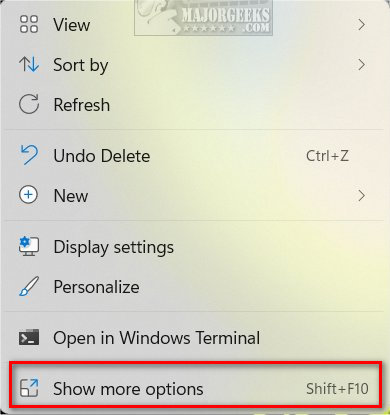
When you right-click in Windows 11, you will see a modern Context Menu. At the bottom, one of the options is Show more options, which is almost useless as it repeats the same options. If you prefer a condensed, organized Context Menu, you can easily remove Show more options.
You can remove 'Show more options' using our registry files or with the Command Prompt.
Video tutorial:
How to Remove 'Show More Options' From the Windows 11 Context Menu - Registry Files
Download Remove or Restore 'Show More Options' From the Windows 11 Context Menu and extract the two files.
Double-click on Show More Options Context Menu - Disable.reg or Show More Options Context Menu - Enable.reg (Default).
Click Yes when prompted by User Account Control.
Click Yes when prompted by Registry Editor.
Click OK when prompted by the Registry Editor. Reboot.
This tweak is included as part of MajorGeeks Windows Tweaks, and donations to the project and MajorGeeks are accepted here.
How to Remove 'Show More Options' From the Windows 11 Context Menu - Command Prompt
Open Windows Terminal, Command Prompt, or PowerShell.
Disable:
reg add "HKCU\Software\Classes\CLSID\{86ca1aa0-34aa-4e8b-a509-50c905bae2a2}\InprocServer32" /f /ve
Enable:
reg delete "HKEY_CURRENT_USER\Software\Classes\CLSID\{86ca1aa0-34aa-4e8b-a509-50c905bae2a2}" /f
Restart Explorer or reboot.
Similar:
How to Disable or Enable Wide Context Menus in Windows 10
Disable or Enable Context Menu Items With ShellExView
How to Delete, Add, and Edit Context Menu Items
How to Add Windows Tools Context Menu in Windows 10
Remove the "Share" Context Menu in Windows 10
How to Add 'Secure Delete' to the Windows 10, 8 and 7 Context Menu
comments powered by Disqus
You can remove 'Show more options' using our registry files or with the Command Prompt.
How to Remove 'Show More Options' From the Windows 11 Context Menu - Registry Files
Download Remove or Restore 'Show More Options' From the Windows 11 Context Menu and extract the two files.
Double-click on Show More Options Context Menu - Disable.reg or Show More Options Context Menu - Enable.reg (Default).
Click Yes when prompted by User Account Control.
Click Yes when prompted by Registry Editor.
Click OK when prompted by the Registry Editor. Reboot.
This tweak is included as part of MajorGeeks Windows Tweaks, and donations to the project and MajorGeeks are accepted here.
How to Remove 'Show More Options' From the Windows 11 Context Menu - Command Prompt
Open Windows Terminal, Command Prompt, or PowerShell.
Disable:
reg add "HKCU\Software\Classes\CLSID\{86ca1aa0-34aa-4e8b-a509-50c905bae2a2}\InprocServer32" /f /ve
Enable:
reg delete "HKEY_CURRENT_USER\Software\Classes\CLSID\{86ca1aa0-34aa-4e8b-a509-50c905bae2a2}" /f
Restart Explorer or reboot.
Similar:
comments powered by Disqus
