


How to Restart or Reset Taskbar in Windows 10 & 11
By Timothy Tibbettson 06/15/2023 |
If you are having issues with your Taskbar, including freezing, disappearing, or errors, it's possible to restart or reset it.
How to Restart or Reset Taskbar in Windows 10 - Windows Key
If your Taskbar has disappeared, try pressing the Windows key. Sometimes, when Explorer crashes or freezes, the taskbar disappears and will reappear when you press the Windows key.
How to Restart or Reset Taskbar in Windows 10 - End Windows Explorer
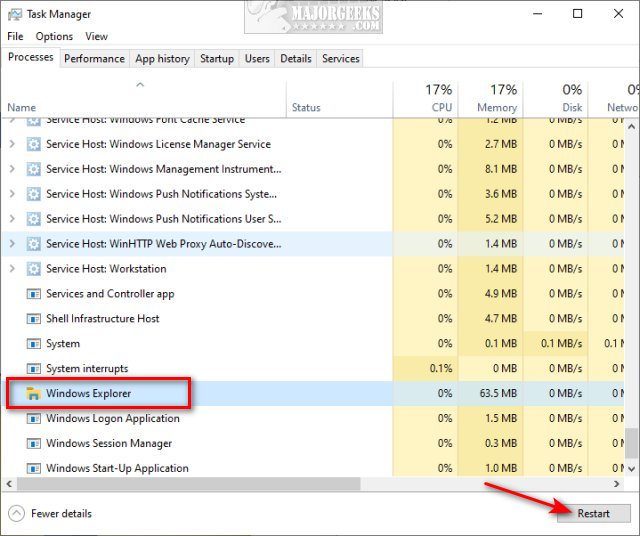
Open Task Manager. Click on the Processes tab.
Scroll down, find, and click on Windows Explorer. Click on Restart in the lower-right corner. Your Taskbar will often disappear, so press the Windows key.
How to Restart or Reset Taskbar in Windows 10 - Batch File
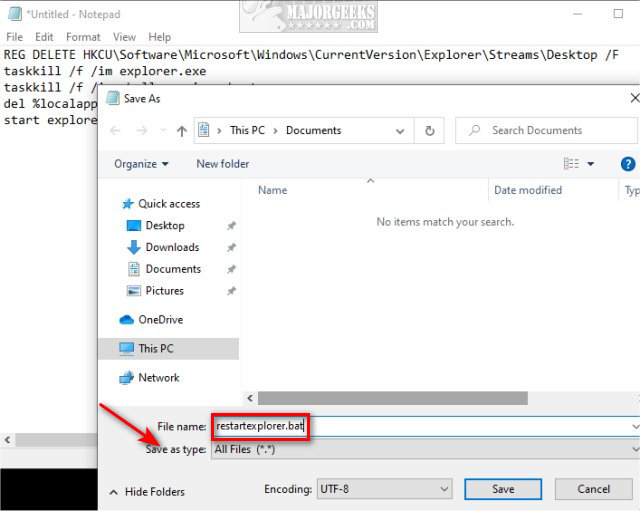
Open Notepad and copy and paste the following code. Save the text document as a .bat file. For example, restartexplorer.bat.
Right-click on the batch file you created and click Run as Administrator.
Similar:
How to Reset Taskbar Toolbars in Windows 7 and 10
How to Customize the Windows 10 Taskbar
How to Change the Taskbar Location in Windows
Get More Windows Screen Space With a Smaller Taskbar
How to Center Your Taskbar Icons in Windows 10
How to Show or Hide the Search Box or Search Icon in Windows 10
comments powered by Disqus
How to Restart or Reset Taskbar in Windows 10 - Windows Key
If your Taskbar has disappeared, try pressing the Windows key. Sometimes, when Explorer crashes or freezes, the taskbar disappears and will reappear when you press the Windows key.
How to Restart or Reset Taskbar in Windows 10 - End Windows Explorer
Open Task Manager. Click on the Processes tab.
Scroll down, find, and click on Windows Explorer. Click on Restart in the lower-right corner. Your Taskbar will often disappear, so press the Windows key.
How to Restart or Reset Taskbar in Windows 10 - Batch File
Open Notepad and copy and paste the following code. Save the text document as a .bat file. For example, restartexplorer.bat.
REG DELETE HKCU\Software\Microsoft\Windows\CurrentVersion\Explorer\Streams\Desktop /F
taskkill /f /im explorer.exe
taskkill /f /im shellexperiencehost.exe
del %localappdata%\Packages\Microsoft.Windows.ShellExperienceHost_cw5n1h2txyewy\TempState\* /q
start explorer.exe
taskkill /f /im explorer.exe
taskkill /f /im shellexperiencehost.exe
del %localappdata%\Packages\Microsoft.Windows.ShellExperienceHost_cw5n1h2txyewy\TempState\* /q
start explorer.exe
Right-click on the batch file you created and click Run as Administrator.
Similar:
comments powered by Disqus
