


Fix: Google Chrome Is Unresponsive - Relaunch Now
By Timothy Tibbettson 06/19/2023 |
"Google Chrome is unresponsive, relaunch now?" is an error that can happen when trying to open a link from an external program in Google Chrome. We've bumped into it using email clients including Mozilla Thunderbird and here's how we solved it.
For us, we just had to clean our cache, history, cookies, and other temporary files. Another, more obvious option is to close and restart Google Chrome. Of course, most drive cleaners will close your web browser when cleaning, so two birds and all that.
We suggest using Wise Disk Cleaner or possibly CCleaner. At the time this was written, we used the junk files cleaner in HiBit Uninstaller. Save your work and close Google Chrome before cleaning.
Optionally, you can clean your Google Chrome temporary files by following these steps:
1: Click Menu (3 dots) in the top right corner and select Settings, and scroll to Advanced. Look for Clear browsing data under "Privacy and security."
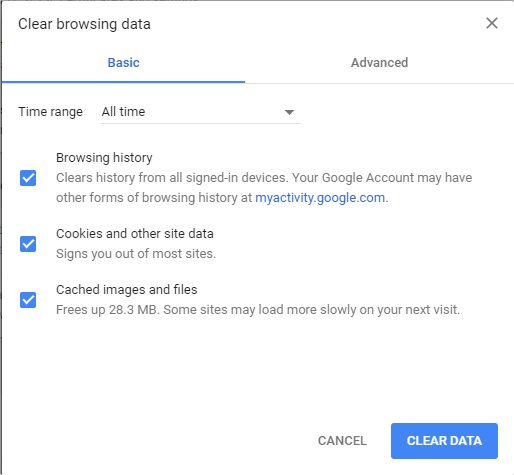
2: Click on Clear Data.
3: Restart Google Chrome.
4: If all else fails, you might try another browser to see if the error continues.
Similar:
How to Make Google Chrome and Mozilla Firefox Run Like New Again
How to Speed up Your Firefox, Chrome or Safari Browser
How to Reset or Repair Google Chrome, Mozilla Firefox or Microsoft Edge
Disable the Google Chrome Software Reporter Tool
Fix: Google Chrome Is Unresponsive - Relaunch Now
How-to Mute Tabs in Google Chrome, Mozilla Firefox, and Microsoft Edge
How-To Fix a Green Screen When Playing Videos in Firefox or Google Chrome
How-To Fix Google Chrome Kill Pages or Wait Error
How-To Fix Google Chrome Black Screen Issues
Manage, Allow, And Change Pop-Up Options in Google Chrome
Block Notifications, Camera, Microphone, and Location in Google Chrome
comments powered by Disqus
For us, we just had to clean our cache, history, cookies, and other temporary files. Another, more obvious option is to close and restart Google Chrome. Of course, most drive cleaners will close your web browser when cleaning, so two birds and all that.
We suggest using Wise Disk Cleaner or possibly CCleaner. At the time this was written, we used the junk files cleaner in HiBit Uninstaller. Save your work and close Google Chrome before cleaning.
Optionally, you can clean your Google Chrome temporary files by following these steps:
1: Click Menu (3 dots) in the top right corner and select Settings, and scroll to Advanced. Look for Clear browsing data under "Privacy and security."
2: Click on Clear Data.
3: Restart Google Chrome.
4: If all else fails, you might try another browser to see if the error continues.
Similar:
How to Make Google Chrome and Mozilla Firefox Run Like New Again
How to Speed up Your Firefox, Chrome or Safari Browser
How to Reset or Repair Google Chrome, Mozilla Firefox or Microsoft Edge
Disable the Google Chrome Software Reporter Tool
Fix: Google Chrome Is Unresponsive - Relaunch Now
How-to Mute Tabs in Google Chrome, Mozilla Firefox, and Microsoft Edge
How-To Fix a Green Screen When Playing Videos in Firefox or Google Chrome
How-To Fix Google Chrome Kill Pages or Wait Error
How-To Fix Google Chrome Black Screen Issues
Manage, Allow, And Change Pop-Up Options in Google Chrome
Block Notifications, Camera, Microphone, and Location in Google Chrome
comments powered by Disqus
